> ## Documentation Index
> Fetch the complete documentation index at: https://docs.consensus.app/llms.txt
> Use this file to discover all available pages before exploring further.
# Citation Grounding
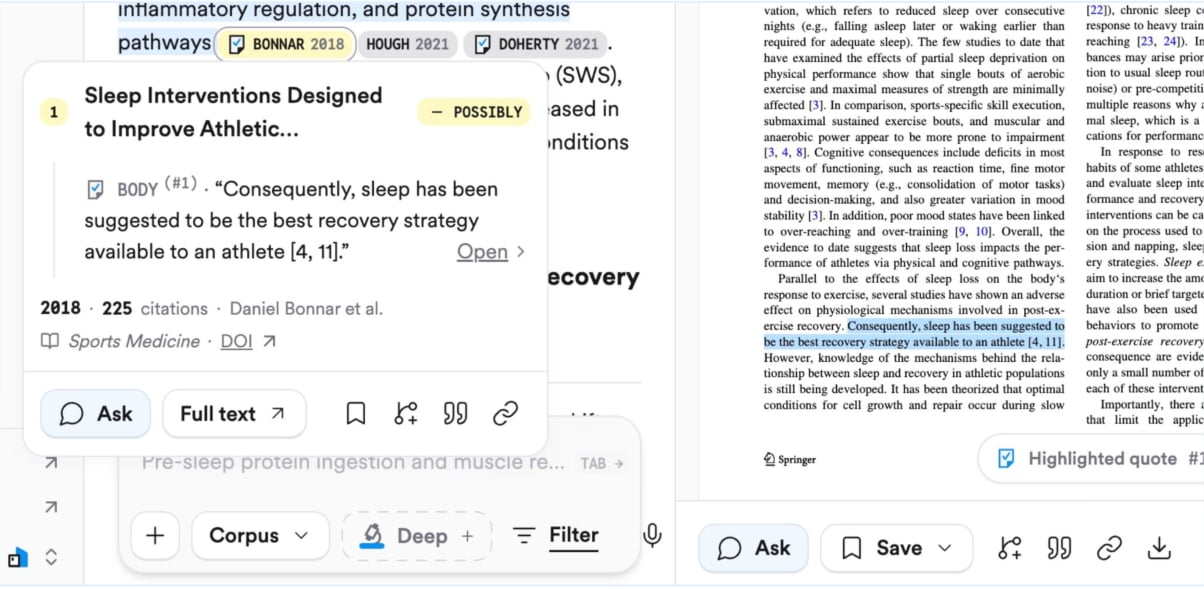
> Citation Grounding shows the exact quote behind every citation in a Consensus answer. Hover to see the passage, click to jump to it in the paper.
Every claim in a Consensus answer is tied to a real paper. Citation Grounding goes one step further: it shows you the exact passage in that paper that supports the claim.
It's a verification layer. Rather than asking you to trust AI search on faith, Consensus lets you check the evidence behind each sentence in seconds.
## How it works
* **Hover a citation** to see the quote from the paper that supports the statement.
* **Click the quote** to open the paper at that exact passage, in its original context.
* **Open the Evidence tab** on a paper to see every quote Consensus pulled from it for your search.
Grounding works best on papers where Consensus has full text. Through [publisher partnerships](/get-started/full-text-access#where-full-text-comes-from) (Wiley, Taylor & Francis, SAGE, ACS, APA, AAAS, Oxford University Press, and others), open-access PDFs, and your own uploads, Consensus can look beyond the abstract to find the supporting passage. See [Full text access](/get-started/full-text-access).
 ## Reading the signals
| Signal | Meaning |
| ----------------------- | ---------------------------------------------------------------------------- |
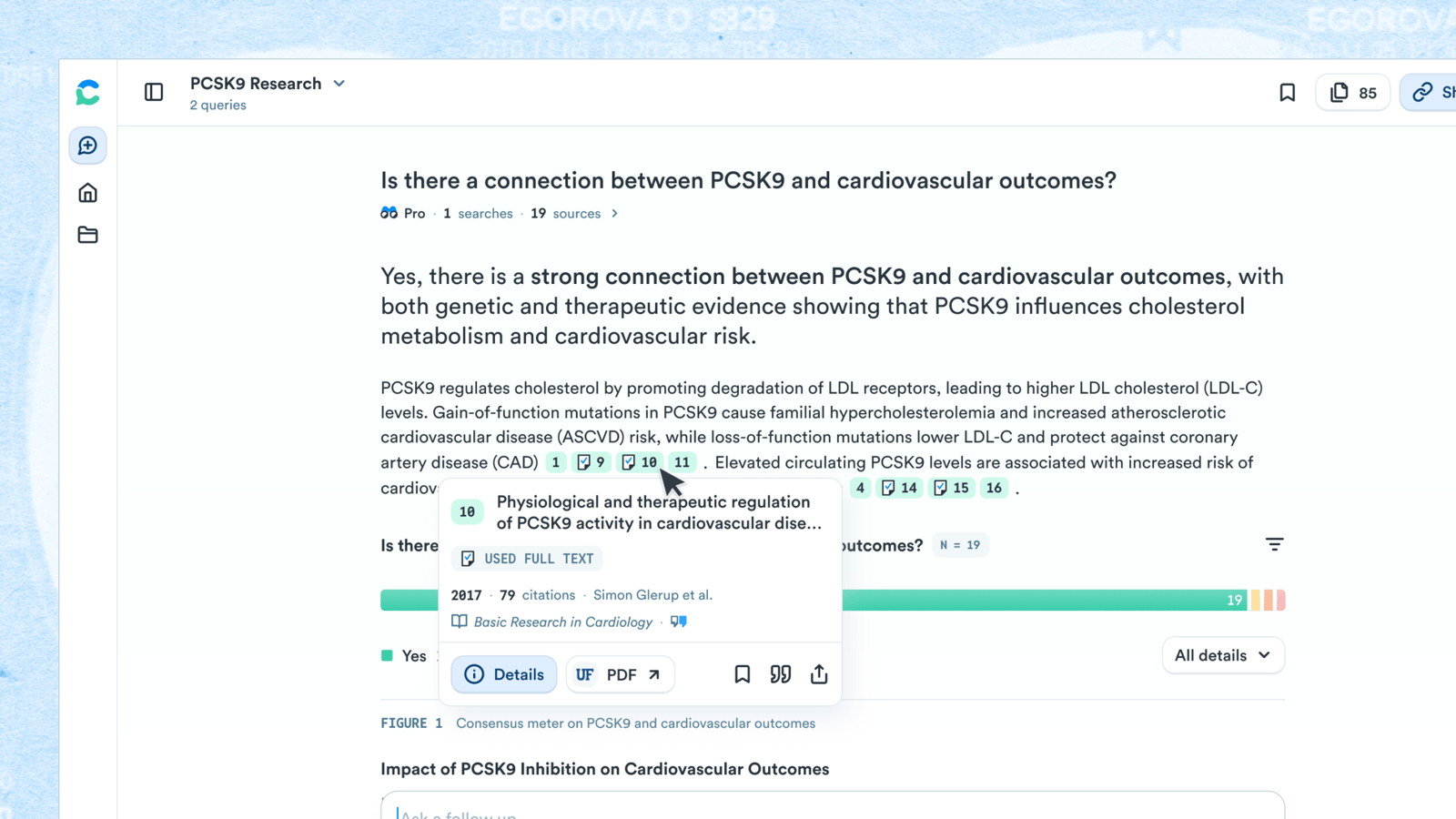
| Checkmark on a citation | The full text of the paper was used in the analysis |
| No checkmark | Only the abstract was used |
| Colored citations | When a Consensus Meter is shown, citations are colored by the paper's stance |
The **Citations** panel in a thread lists every paper cited across the conversation.
## Reading the signals
| Signal | Meaning |
| ----------------------- | ---------------------------------------------------------------------------- |
| Checkmark on a citation | The full text of the paper was used in the analysis |
| No checkmark | Only the abstract was used |
| Colored citations | When a Consensus Meter is shown, citations are colored by the paper's stance |
The **Citations** panel in a thread lists every paper cited across the conversation.
 ## Where it appears
Citation Grounding applies to AI-generated answers in the Consensus web app: Pro messages and Deep searches. The MCP server and API return paper metadata and key takeaways rather than per-claim quotes.
## Why it matters
Consensus is built on a simple rule: if the system can't ground an answer in real evidence, it won't make one up. Citation Grounding makes that rule visible. You can audit any sentence, catch a paper cited for something it never claimed, and move from an answer to the primary source without leaving the page.
Combine Citation Grounding with a [citation verification workflow](/use-cases/citation-verification) to audit an entire bibliography.
## Related
How Consensus reads paywalled papers.
The agent that produces grounded answers.
## Where it appears
Citation Grounding applies to AI-generated answers in the Consensus web app: Pro messages and Deep searches. The MCP server and API return paper metadata and key takeaways rather than per-claim quotes.
## Why it matters
Consensus is built on a simple rule: if the system can't ground an answer in real evidence, it won't make one up. Citation Grounding makes that rule visible. You can audit any sentence, catch a paper cited for something it never claimed, and move from an answer to the primary source without leaving the page.
Combine Citation Grounding with a [citation verification workflow](/use-cases/citation-verification) to audit an entire bibliography.
## Related
How Consensus reads paywalled papers.
The agent that produces grounded answers.