> ## Documentation Index
> Fetch the complete documentation index at: https://docs.consensus.app/llms.txt
> Use this file to discover all available pages before exploring further.
# MCP
> The Consensus MCP server lets Claude, ChatGPT, Cursor, and any MCP-compatible client search 220 million peer-reviewed papers from inside the conversation.
The Consensus MCP server brings Consensus search into the AI tools you already use. Connect it once and your assistant can search over 220 million peer-reviewed papers, apply academic filters, and cite real research in its answers.
The server is hosted, so there's nothing to install or run:
```text theme={null}
https://mcp.consensus.app/mcp
```
Step-by-step connection guides for Claude, ChatGPT, Claude Code, Cursor, VS Code, Windsurf, Gemini Spark, Microsoft 365 Copilot, and any other MCP client.
## What it exposes
One tool, `search`, which returns ranked papers with title, authors, journal, publication year, citation count, study type, a key takeaway, and a link to the paper on Consensus. On paid plans it can also return query-relevant full-text excerpts, so your assistant can quote the passage behind each claim. Your assistant can pass the same filters Research Agent uses:
* Year range, study type, and journal quartile (SJR)
* Human and controlled studies, minimum sample size, minimum citations
* Medical mode, open access only, exclude preprints
* Study duration and country
The MCP server searches the Consensus research index. It doesn't search your Library or run Deep searches.
## Supported clients
Claude (web, desktop, and Claude Code), ChatGPT and ChatGPT Deep Research, Codex, Cursor, VS Code and GitHub Copilot, Windsurf, Gemini Spark, Microsoft 365 Copilot and Copilot Studio, and any client that supports remote MCP servers.
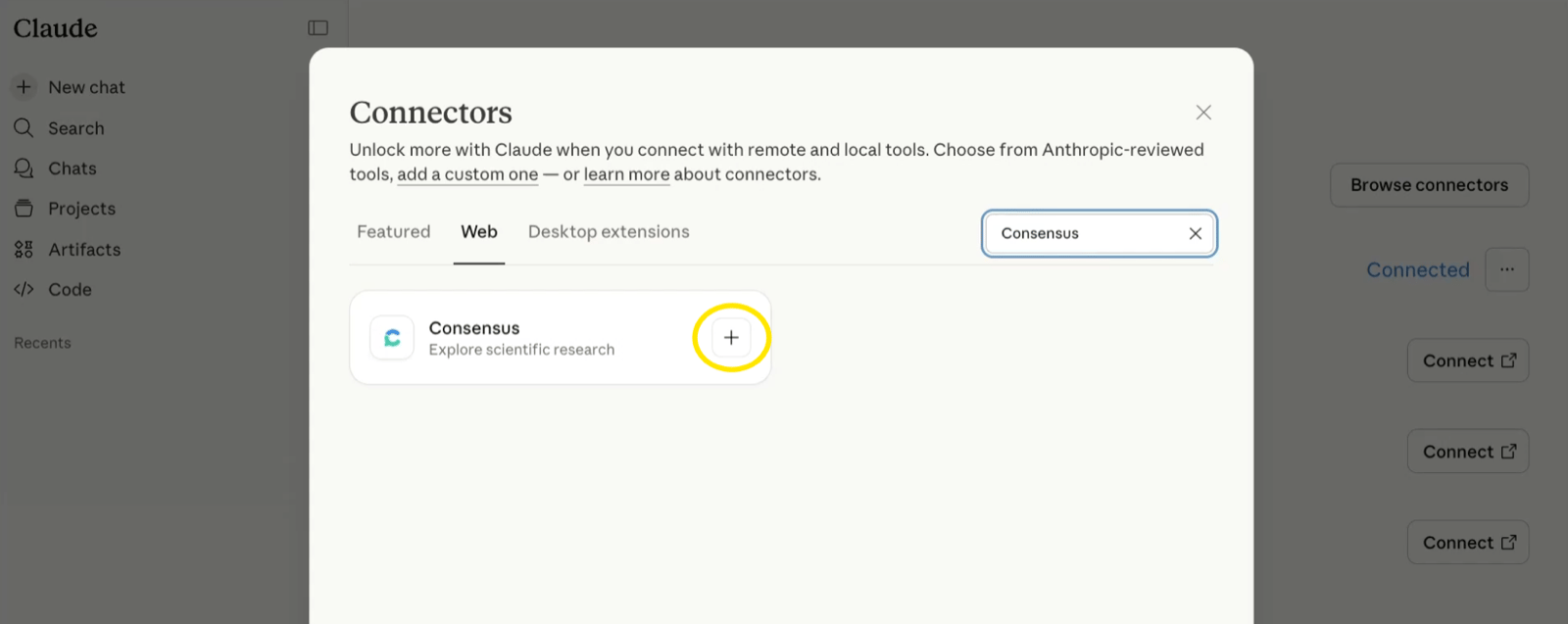
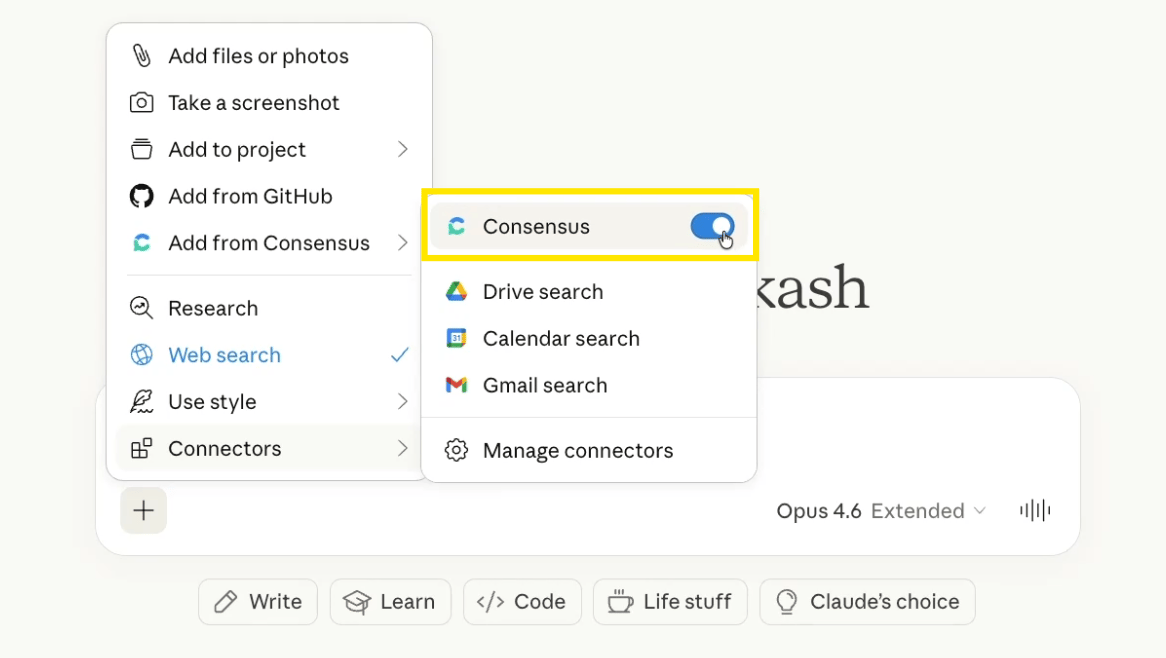
Open **Settings › Connectors**, search for Consensus, and click **+**. Then switch it on from the **+** menu in any chat under **Connectors**.
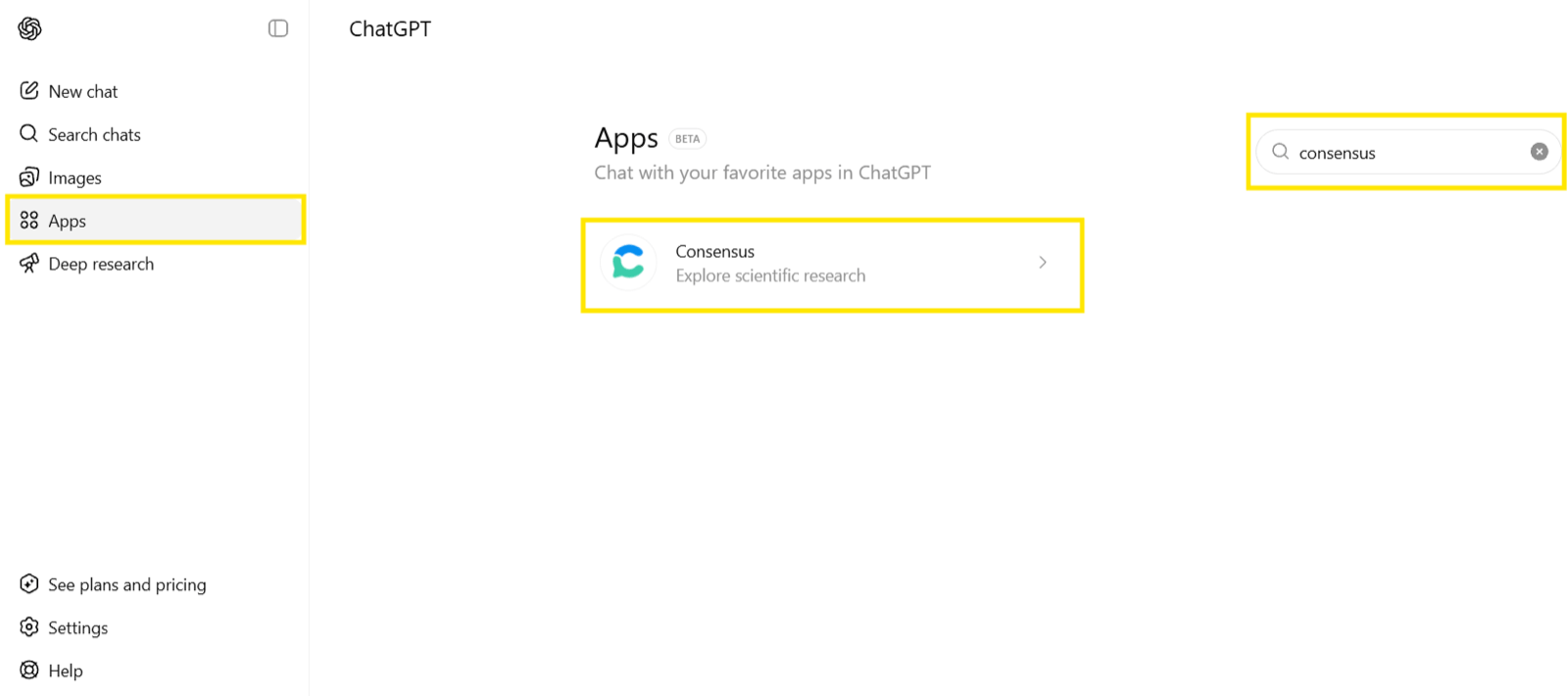
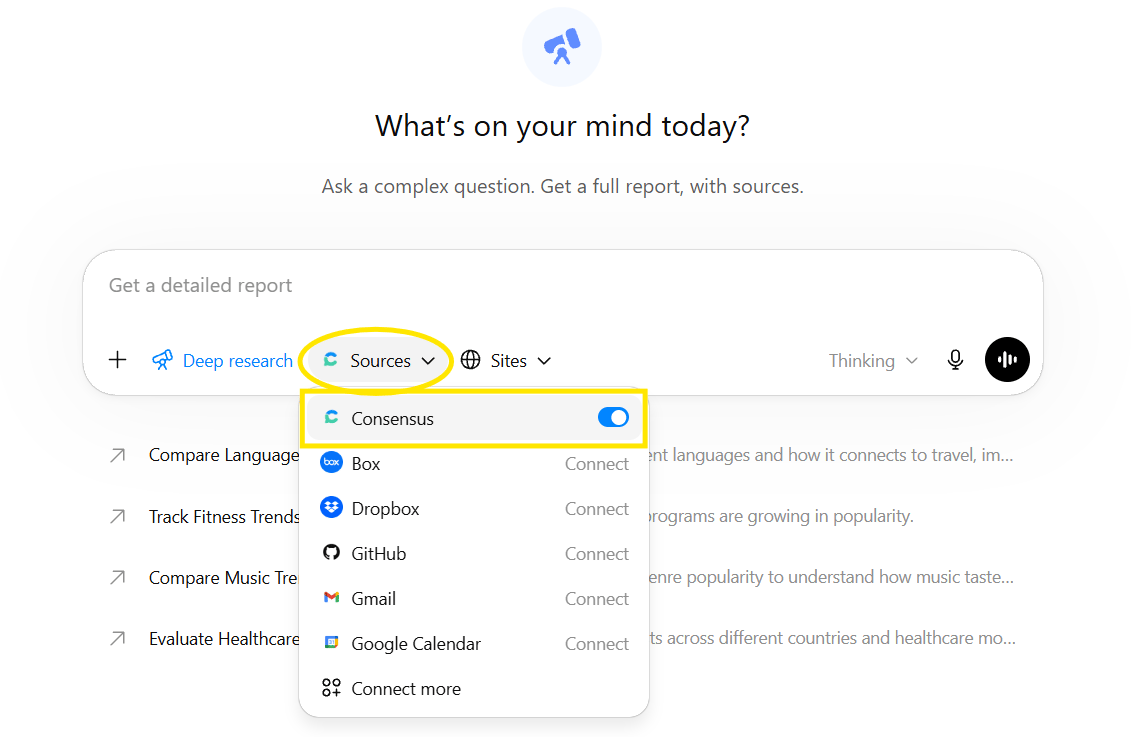
 Open **Apps**, search for Consensus, and connect. It also works inside **Deep research**: open **Sources** and toggle Consensus on.
 Sign in with your Consensus account on first connect. You can use it without an account at reduced limits; your results depend on your Consensus plan, not your Claude or ChatGPT subscription.
## Pre-built workflows
Consensus publishes prompt templates ("skills") for common research jobs you can run through MCP:
* **Literature review helper** — reconnaissance, PICO/SPIDER decomposition, systematic searching, and synthesis.
* **Curriculum development** — parse a syllabus into a reading list with discussion questions.
* **Grant research** — position your idea, map it to NIH institutes and mechanisms, and find funded overlap.
Browse the full gallery in [Use cases](/use-cases).
## Plans and limits
API and MCP calls share one monthly pool.
| Plan | Max papers per call | Included calls per month | Extra features |
| ---------- | ------------------- | ------------------------ | ------------------------- |
| No account | 3 | Unlimited (rate-limited) | — |
| Free | 10 | 30 | Full abstracts |
| Pro | 300 | 500 | Study type, key takeaways |
| Deep | 750 | 2,000 | Study type, key takeaways |
| Teams | 300 | 500 | Study type, key takeaways |
* A call covers up to 100 papers: 1–100 papers is 1 call, 101–200 is 2, and so on. Requests default to 20 papers.
* Paid plans can enable **additional usage** at \$0.05 per call, up to 1,000 calls per month (10,000 on Deep). It's off by default.
* Rate limit: 1 request per second.
* Usage resets on the 1st of each month.
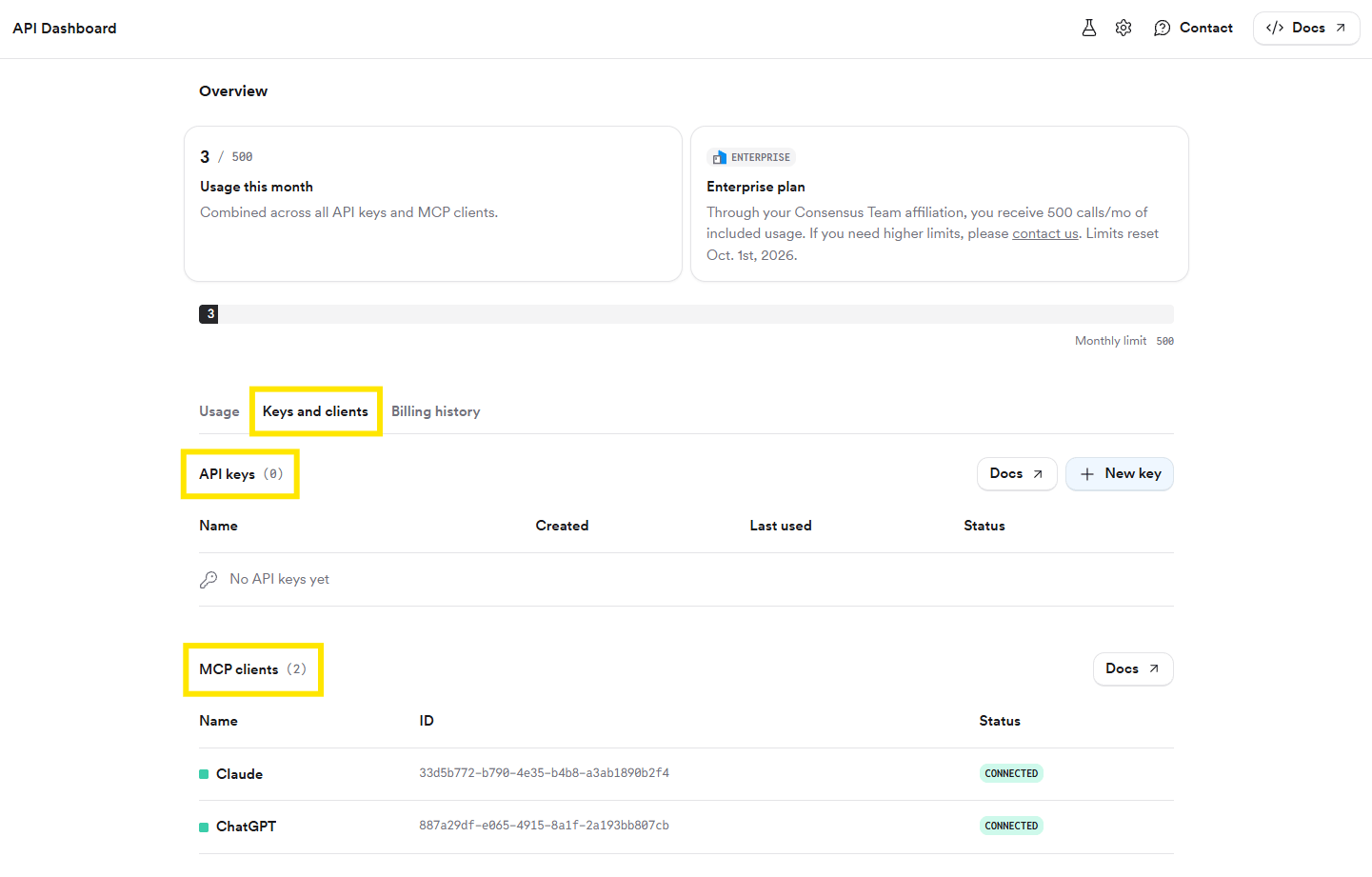
Track usage, connected clients, and billing from your profile icon under **API & MCP Dashboard**.
Sign in with your Consensus account on first connect. You can use it without an account at reduced limits; your results depend on your Consensus plan, not your Claude or ChatGPT subscription.
## Pre-built workflows
Consensus publishes prompt templates ("skills") for common research jobs you can run through MCP:
* **Literature review helper** — reconnaissance, PICO/SPIDER decomposition, systematic searching, and synthesis.
* **Curriculum development** — parse a syllabus into a reading list with discussion questions.
* **Grant research** — position your idea, map it to NIH institutes and mechanisms, and find funded overlap.
Browse the full gallery in [Use cases](/use-cases).
## Plans and limits
API and MCP calls share one monthly pool.
| Plan | Max papers per call | Included calls per month | Extra features |
| ---------- | ------------------- | ------------------------ | ------------------------- |
| No account | 3 | Unlimited (rate-limited) | — |
| Free | 10 | 30 | Full abstracts |
| Pro | 300 | 500 | Study type, key takeaways |
| Deep | 750 | 2,000 | Study type, key takeaways |
| Teams | 300 | 500 | Study type, key takeaways |
* A call covers up to 100 papers: 1–100 papers is 1 call, 101–200 is 2, and so on. Requests default to 20 papers.
* Paid plans can enable **additional usage** at \$0.05 per call, up to 1,000 calls per month (10,000 on Deep). It's off by default.
* Rate limit: 1 request per second.
* Usage resets on the 1st of each month.
Track usage, connected clients, and billing from your profile icon under **API & MCP Dashboard**.
 Enterprise customers can pass an API key as a Bearer token for unlimited rate limits. Contact [sales@consensus.app](mailto:sales@consensus.app).
## Security
Only connect to the official URL above. Queries travel over HTTPS, results contain publicly available paper metadata, and no personal data is stored from MCP requests.
## Related
Connect your client in under 2 minutes.
The same search over REST.
Enterprise customers can pass an API key as a Bearer token for unlimited rate limits. Contact [sales@consensus.app](mailto:sales@consensus.app).
## Security
Only connect to the official URL above. Queries travel over HTTPS, results contain publicly available paper metadata, and no personal data is stored from MCP requests.
## Related
Connect your client in under 2 minutes.
The same search over REST.