> ## Documentation Index
> Fetch the complete documentation index at: https://docs.consensus.app/llms.txt
> Use this file to discover all available pages before exploring further.
# Research Agent
> Research Agent is the AI research assistant behind every Pro message and Deep search in Consensus. It plans searches, chains tools, applies academic filters, and returns citation-backed answers.
Research Agent is the engine that powers searches in Consensus. Instead of running one search at a time, it reasons across multiple tools, chains them together, and returns citation-backed answers grounded in peer-reviewed research.
You don't switch it on. Every Pro message and Deep search runs through Research Agent.
## What it does
* **Plans multi-step searches.** Breaks a complex question into sub-questions and runs targeted sub-searches when a single query isn't enough.
* **Applies filters in plain language.** Stack recency, journal quartile, citation count, sample size, study type, and population by describing what you want. Research Agent picks the right filters automatically.
* **Traces authors and citations.** Give it a DOI, a paper title, or an author name to explore co-authors, influential papers, and how the work developed over time.
* **Excludes what you don't want.** Filter out the wrong population, methodology, publication type, or author.
* **Carries context between searches.** Follow-up questions build on the previous search, so you can refine, pivot, and synthesize without starting over.
* **Reads and compares papers.** Reads full text where available, surfaces relevant findings, and builds comparison tables across studies.
* **Finds gaps.** Detects missing populations or research areas in a Library collection or set of papers.
## How to use it
Go to [consensus.app](https://consensus.app).
Type a question, topic, messy prompt, or Boolean-style query in the search bar. Research Agent handles all three.
By default the message runs as a Pro message. Click **Deep** to upgrade it to a Deep search for a longer, more comprehensive analysis.
Ask a follow-up in the same thread. Research Agent keeps the context, so "now only Q1 journals" or "exclude animal studies" just works.
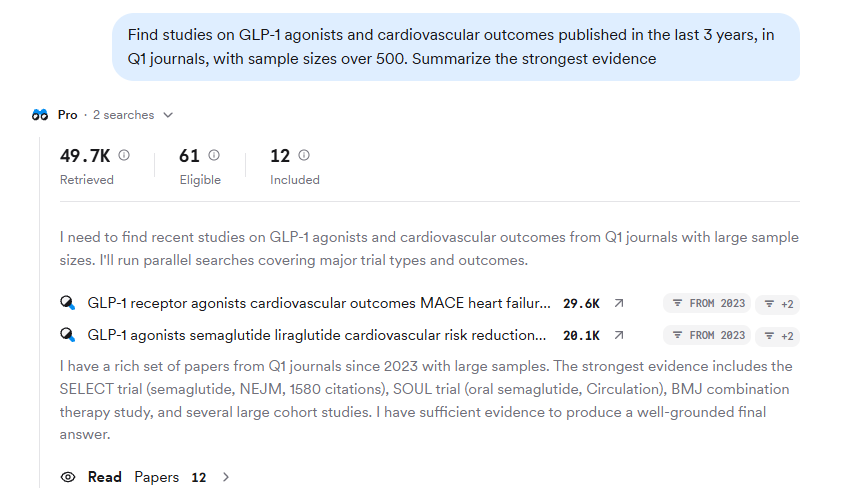 ## Example prompts
```text theme={null}
Find studies on GLP-1 agonists and cardiovascular outcomes published in the last 3 years,
in Q1 journals, with sample sizes over 500. Summarize the strongest evidence.
```
```text theme={null}
Find RCTs on CBT, IPT, and digital interventions for adolescent depression. Build a
comparison table with columns: intervention type, sample size, session count,
follow-up duration, and effect size on depression symptoms.
```
```text theme={null}
Starting from Jennifer Doudna's foundational paper on CRISPR-Cas9, identify the most
important papers it cites that contributed to it as a genome-editing tool, then identify
the key later papers that cite it. Organize results by year and type of contribution.
```
## What you get back
## Example prompts
```text theme={null}
Find studies on GLP-1 agonists and cardiovascular outcomes published in the last 3 years,
in Q1 journals, with sample sizes over 500. Summarize the strongest evidence.
```
```text theme={null}
Find RCTs on CBT, IPT, and digital interventions for adolescent depression. Build a
comparison table with columns: intervention type, sample size, session count,
follow-up duration, and effect size on depression symptoms.
```
```text theme={null}
Starting from Jennifer Doudna's foundational paper on CRISPR-Cas9, identify the most
important papers it cites that contributed to it as a genome-editing tool, then identify
the key later papers that cite it. Organize results by year and type of contribution.
```
## What you get back
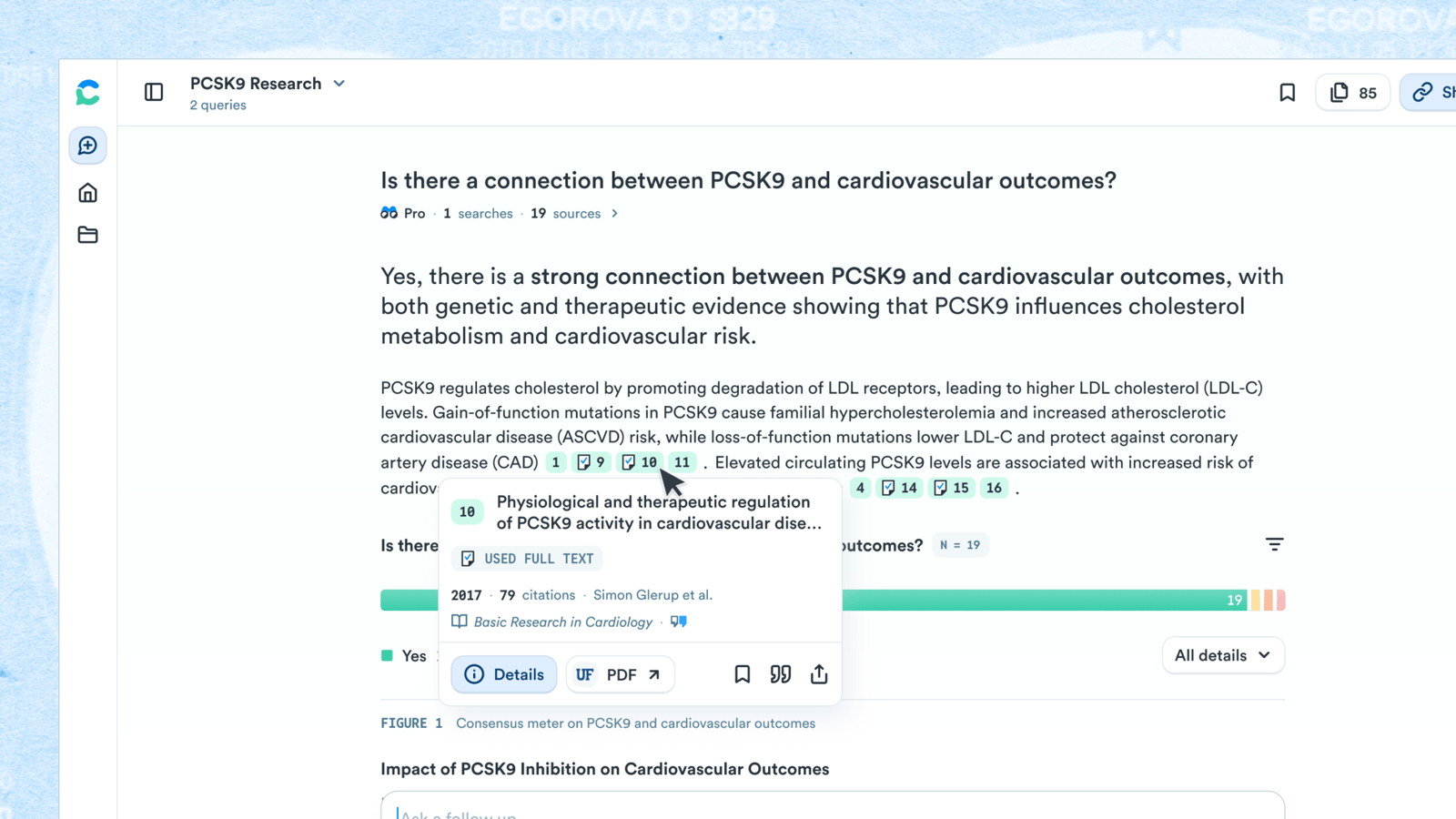 Answers appear in the thread with in-line citations that link directly to the papers supporting each statement. A checkmark on a citation means the full text of the paper was used in the analysis; no checkmark means the abstract was used.
Depending on the question, the answer may include:
* **Consensus Meter** — a "yes or no" visualization showing where the research leans.
* **Claims & Evidence table** — strength of support, reasoning, and key papers for each claim.
* **Research Gaps heat map** — areas with limited research.
* **Results timeline** and a **TL;DR** header.
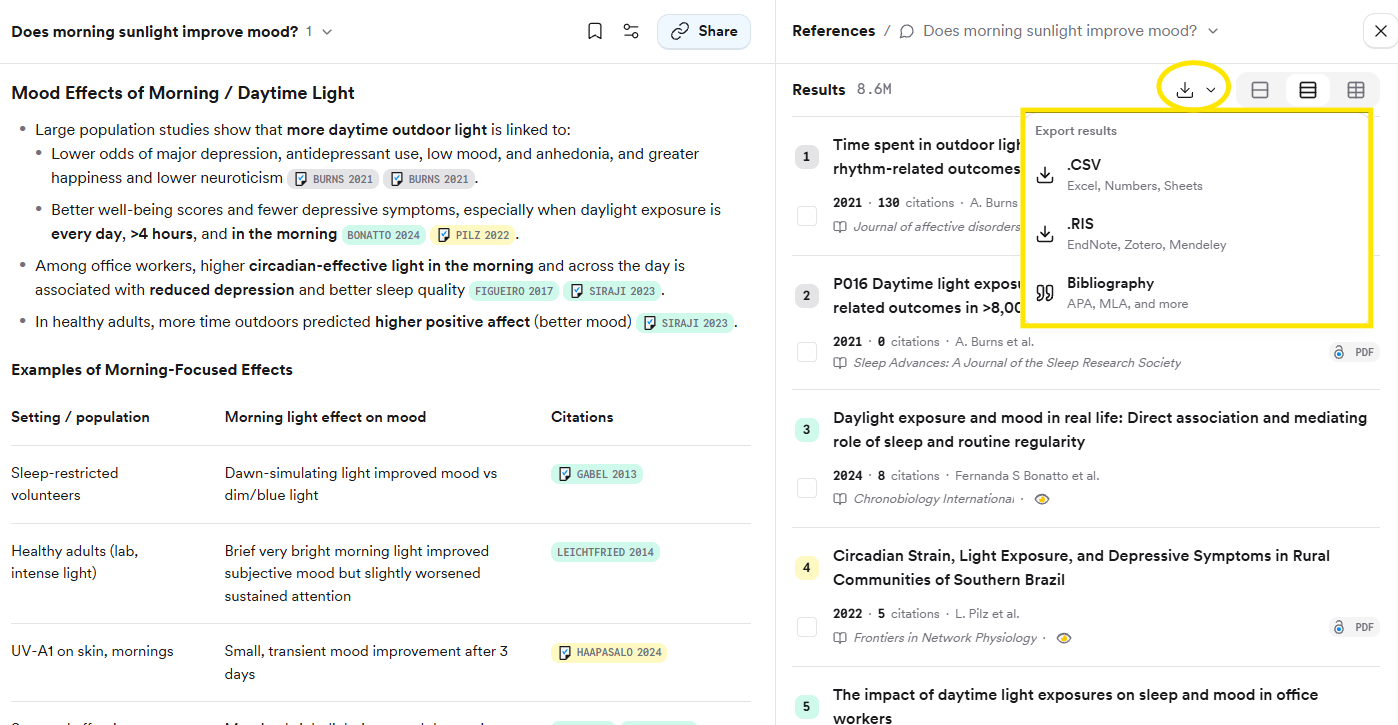
Export any answer with **Copy text**, **Copy with citations** (APA, MLA, Chicago, Harvard, LaTeX, AMA/Numeric), or **Export as PDF**. The papers themselves export as CSV, RIS, or a formatted bibliography from the References panel.
Answers appear in the thread with in-line citations that link directly to the papers supporting each statement. A checkmark on a citation means the full text of the paper was used in the analysis; no checkmark means the abstract was used.
Depending on the question, the answer may include:
* **Consensus Meter** — a "yes or no" visualization showing where the research leans.
* **Claims & Evidence table** — strength of support, reasoning, and key papers for each claim.
* **Research Gaps heat map** — areas with limited research.
* **Results timeline** and a **TL;DR** header.
Export any answer with **Copy text**, **Copy with citations** (APA, MLA, Chicago, Harvard, LaTeX, AMA/Numeric), or **Export as PDF**. The papers themselves export as CSV, RIS, or a formatted bibliography from the References panel.
 ## Availability
Research Agent runs in Pro and Deep search modes.
| Plan | Pro messages | Deep searches |
| ----- | ------------ | --------------------- |
| Free | 10 per month | 3 per month |
| Pro | Unlimited | 15 per month |
| Deep | Unlimited | 200 per month |
| Teams | Unlimited | 50 per month per user |
Research Agent is a web-app feature. The [MCP server](/core-features/mcp) and [API](/core-features/api) expose the underlying paper search, not the agent.
## Under the hood
Research Agent is a multi-agent system. A planning agent breaks down your question and decides which actions to take; a search agent combs the paper index, your private Library, and the citation graph; a reading agent interprets papers individually or in batches; and an analysis agent synthesizes the results and composes the answer. If no relevant studies meet its quality threshold, it says so rather than inventing an answer.
Research Agent replaced Scholar Agent in May 2026. If you see "Scholar Agent" in older material, it refers to the previous version of this feature.
## Related
The longer, more robust version of a search: 50 to 100 papers.
See the exact quote behind every citation.
## Availability
Research Agent runs in Pro and Deep search modes.
| Plan | Pro messages | Deep searches |
| ----- | ------------ | --------------------- |
| Free | 10 per month | 3 per month |
| Pro | Unlimited | 15 per month |
| Deep | Unlimited | 200 per month |
| Teams | Unlimited | 50 per month per user |
Research Agent is a web-app feature. The [MCP server](/core-features/mcp) and [API](/core-features/api) expose the underlying paper search, not the agent.
## Under the hood
Research Agent is a multi-agent system. A planning agent breaks down your question and decides which actions to take; a search agent combs the paper index, your private Library, and the citation graph; a reading agent interprets papers individually or in batches; and an analysis agent synthesizes the results and composes the answer. If no relevant studies meet its quality threshold, it says so rather than inventing an answer.
Research Agent replaced Scholar Agent in May 2026. If you see "Scholar Agent" in older material, it refers to the previous version of this feature.
## Related
The longer, more robust version of a search: 50 to 100 papers.
See the exact quote behind every citation.