> ## Documentation Index
> Fetch the complete documentation index at: https://docs.consensus.app/llms.txt
> Use this file to discover all available pages before exploring further.
# Build Collections for your project
> Organise your project's papers into Collections by theme, add papers from anywhere, ask questions of everything you've saved, and share it with collaborators.
In [Save papers to your Library](/get-started/save-papers-to-your-library) you made a Collection for your project. By now it probably holds a few dozen papers. This lesson turns it into a reading list you can work from and share.
## Step 1: Split it by theme
Collections can be nested. Create a sub-Collection for each theme you found in [Spot the main findings and themes](/learn/spot-main-findings): click the new-Collection button and pick your project Collection under **Create in**.
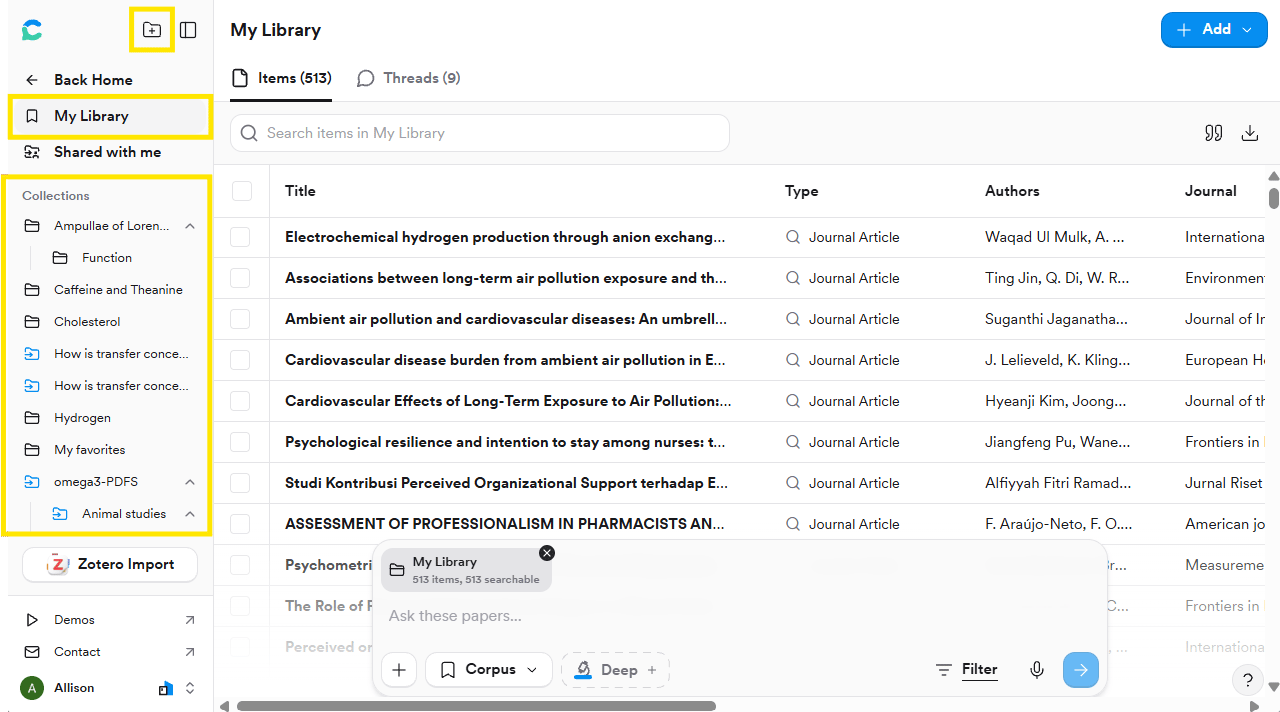 ## Step 2: Add papers from anywhere
Click **+ Add** in the top right of My Library to:
## Step 2: Add papers from anywhere
Click **+ Add** in the top right of My Library to:
 * **Upload PDFs**, such as papers a colleague sent you
* **Paste DOIs** from a reading list
* **Import from Zotero**, if you already use it
## Step 3: Ask questions of your Collection
Open the Collection and type in the search bar at the bottom. Consensus answers using only the papers in that Collection.
```text theme={null}
Which papers in this collection support the claim that [statement]?
```
```text theme={null}
Summarize what this collection says about [topic], and which papers I should read first.
```
## Step 4: Share it with collaborators
In **My Library**, click the Collection in the left sidebar. The **Share** button appears in the top right.
* **Upload PDFs**, such as papers a colleague sent you
* **Paste DOIs** from a reading list
* **Import from Zotero**, if you already use it
## Step 3: Ask questions of your Collection
Open the Collection and type in the search bar at the bottom. Consensus answers using only the papers in that Collection.
```text theme={null}
Which papers in this collection support the claim that [statement]?
```
```text theme={null}
Summarize what this collection says about [topic], and which papers I should read first.
```
## Step 4: Share it with collaborators
In **My Library**, click the Collection in the left sidebar. The **Share** button appears in the top right.
 Click **Share**. Type an email address under **Invite via email** to invite someone directly, or click **Copy invite link** to share a link that lets anyone who has it join as a viewer.
**Viewers** can read the papers and search the Collection; **Editors** can also add and remove papers. People without a Consensus account are prompted to create a free one.
## Try it on your topic
Split your project Collection into sub-Collections by theme, then share it with a collaborator.
**You should now have:** an organised, shareable Collection that someone else can open and understand.
See [Library](/core-features/library) for Zotero import details, file limits, exporting a bibliography or RIS file, and running a Deep Review over a Collection.
This documentation is built and hosted on [Mintlify](https://mintlify.com), a developer documentation platform.
Click **Share**. Type an email address under **Invite via email** to invite someone directly, or click **Copy invite link** to share a link that lets anyone who has it join as a viewer.
**Viewers** can read the papers and search the Collection; **Editors** can also add and remove papers. People without a Consensus account are prompted to create a free one.
## Try it on your topic
Split your project Collection into sub-Collections by theme, then share it with a collaborator.
**You should now have:** an organised, shareable Collection that someone else can open and understand.
See [Library](/core-features/library) for Zotero import details, file limits, exporting a bibliography or RIS file, and running a Deep Review over a Collection.
This documentation is built and hosted on [Mintlify](https://mintlify.com), a developer documentation platform.