> ## Documentation Index
> Fetch the complete documentation index at: https://docs.consensus.app/llms.txt
> Use this file to discover all available pages before exploring further.
# Read a thread
> What every part of a search result means: the search trace, the written answer, the citations, and the reference list with its study types and citation counts.
A Consensus result has two halves: the **answer** on the left and the **papers** behind it on the right. Learning to read both is what turns an AI summary into something you understand and can defend.
 ## 1. The search trace
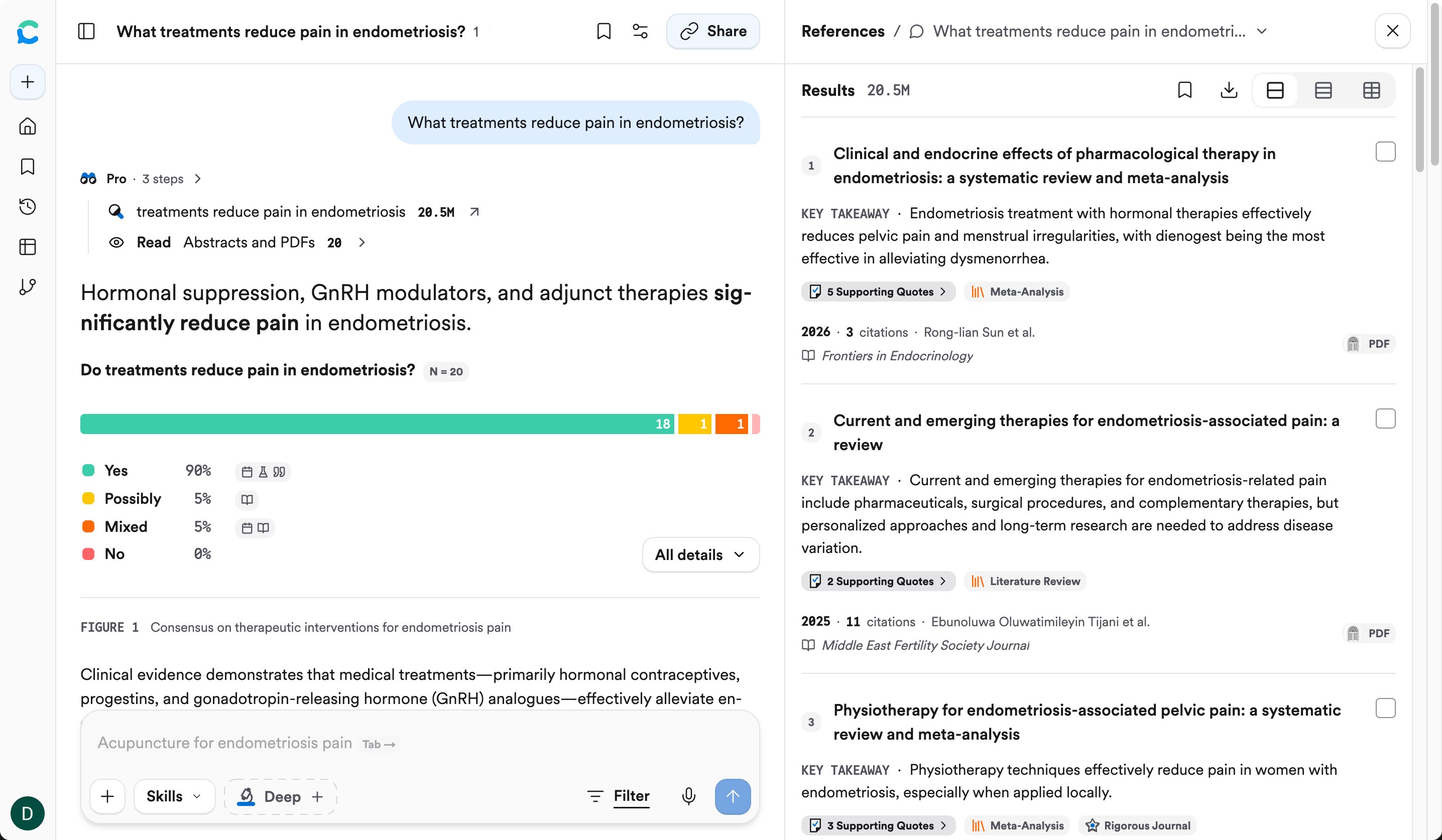
The lines at the top of the answer (for example, **Pro · 3 steps**) show what Consensus actually did: what it searched for, how many papers matched, and how many it read. Click a step to see more.
## 1. The search trace
The lines at the top of the answer (for example, **Pro · 3 steps**) show what Consensus actually did: what it searched for, how many papers matched, and how many it read. Click a step to see more.
 Check this first. If Consensus searched for something different from what you meant, rephrase your question before reading the answer.
## 2. The answer
The answer summarizes what the research says. Look for:
* **Citations.** The grey tags in the text (like `Sun 2026`) link each statement to a paper. A small document icon with a tick next to a citation means Consensus read the full paper; without it, Consensus read only the abstract. Hover any citation to see the exact quote; see [Check a claim against the paper](/core-features/citation-grounding).
* **Hedged language.** Words like "mixed", "limited", or "some studies" are the answer telling you the evidence isn't settled. Don't skip past them.
* **Visuals**, depending on your question: tables and figures comparing studies, a **Claims & Evidence** table rating how well each claim is supported, a **Research Gaps** map, or a **timeline**.
### The Consensus Meter
For a yes/no question, the answer opens with the **Consensus Meter**: how many of the papers lean **Yes**, **Possibly**, **Mixed**, or **No**. **N** is the number of papers counted.
Check this first. If Consensus searched for something different from what you meant, rephrase your question before reading the answer.
## 2. The answer
The answer summarizes what the research says. Look for:
* **Citations.** The grey tags in the text (like `Sun 2026`) link each statement to a paper. A small document icon with a tick next to a citation means Consensus read the full paper; without it, Consensus read only the abstract. Hover any citation to see the exact quote; see [Check a claim against the paper](/core-features/citation-grounding).
* **Hedged language.** Words like "mixed", "limited", or "some studies" are the answer telling you the evidence isn't settled. Don't skip past them.
* **Visuals**, depending on your question: tables and figures comparing studies, a **Claims & Evidence** table rating how well each claim is supported, a **Research Gaps** map, or a **timeline**.
### The Consensus Meter
For a yes/no question, the answer opens with the **Consensus Meter**: how many of the papers lean **Yes**, **Possibly**, **Mixed**, or **No**. **N** is the number of papers counted.
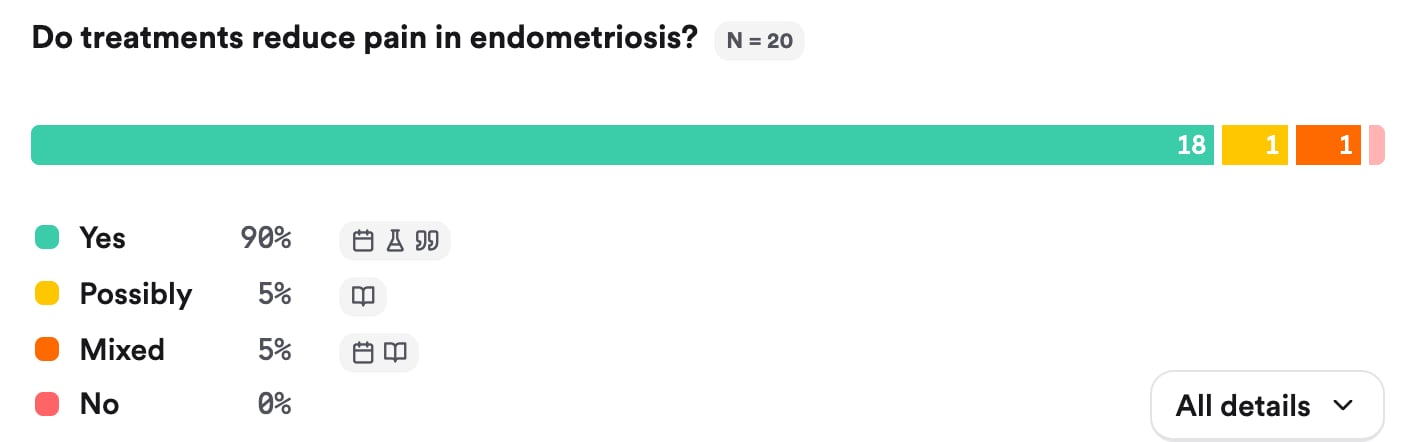 A meter that's mostly one color means the research broadly agrees. A split meter is a sign to read [Find where studies disagree](/learn/where-studies-disagree).
## 3. The References panel
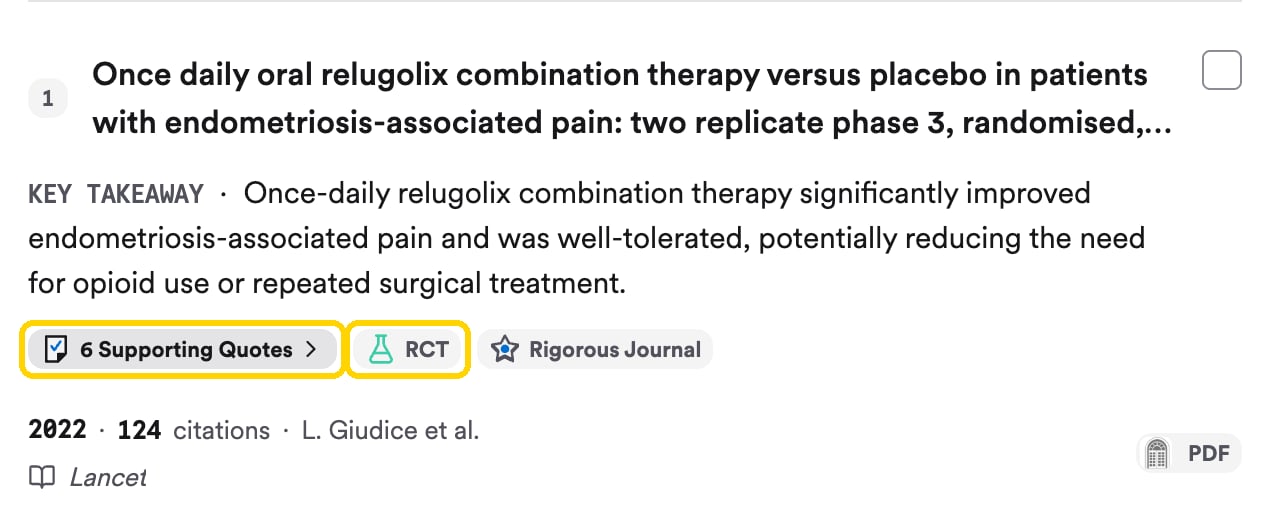
Each paper in the panel shows:
A meter that's mostly one color means the research broadly agrees. A split meter is a sign to read [Find where studies disagree](/learn/where-studies-disagree).
## 3. The References panel
Each paper in the panel shows:
 | Item | What it tells you |
| - | - |
| **Key takeaway** | The paper's main finding in one sentence |
| **Supporting quotes** | The passages from this paper the answer relies on. Click to read them. |
| **Study type** badge | How the study was done (see below). Some papers also get badges like **Highly cited** or **Rigorous journal**. |
| **Year** and **citations** | How recent it is, and how much attention it's had |
| **Journal** | Where it was published |
| **PDF** | The full text is available to open |
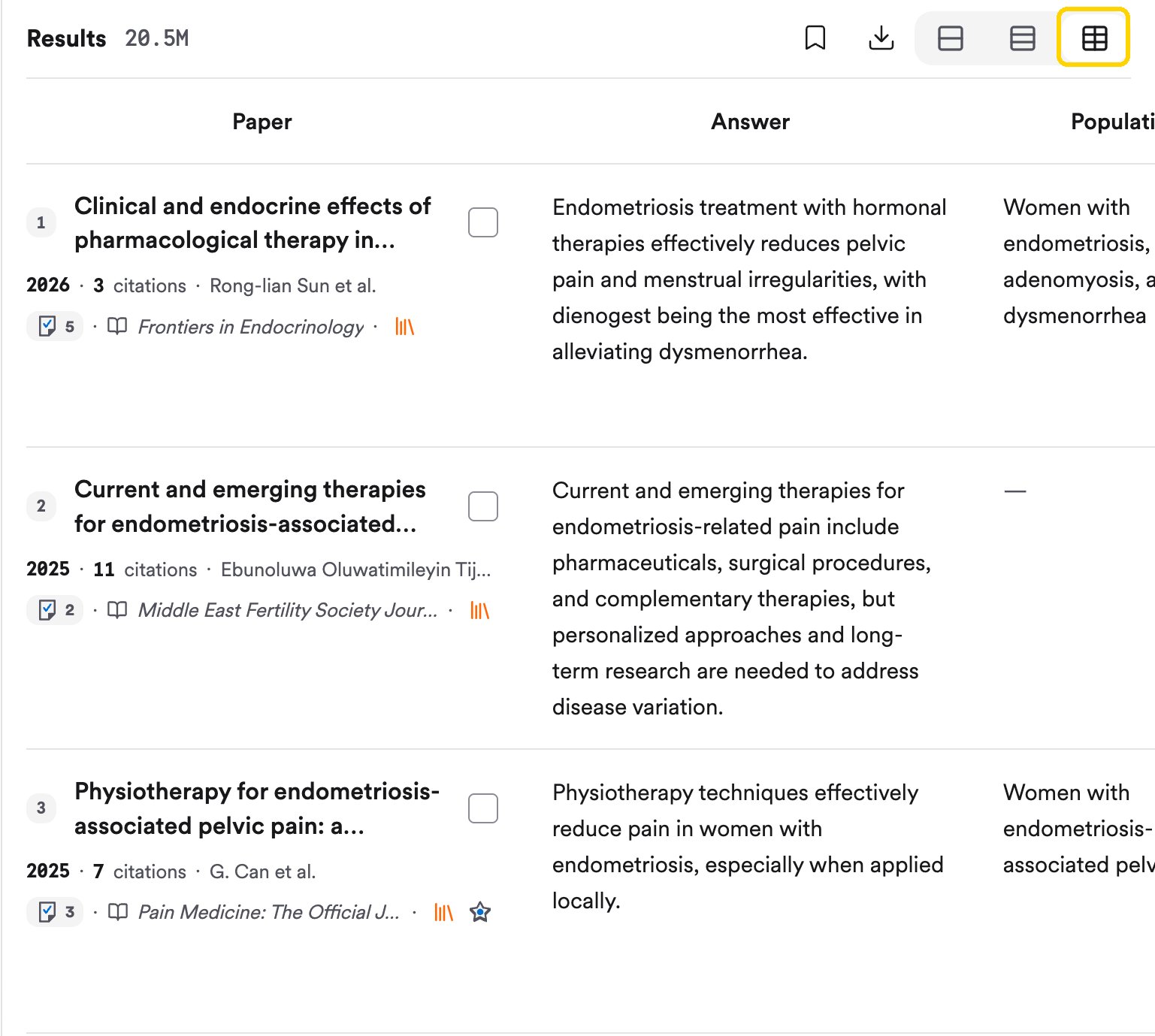
Switch between the default list, a compact list, and a **Table** view with the buttons at the top of the panel. The table view adds columns like the paper's answer to your question and the population studied, so you can compare papers at a glance.
| Item | What it tells you |
| - | - |
| **Key takeaway** | The paper's main finding in one sentence |
| **Supporting quotes** | The passages from this paper the answer relies on. Click to read them. |
| **Study type** badge | How the study was done (see below). Some papers also get badges like **Highly cited** or **Rigorous journal**. |
| **Year** and **citations** | How recent it is, and how much attention it's had |
| **Journal** | Where it was published |
| **PDF** | The full text is available to open |
Switch between the default list, a compact list, and a **Table** view with the buttons at the top of the panel. The table view adds columns like the paper's answer to your question and the population studied, so you can compare papers at a glance.
 ## Study types, in plain English
Consensus is able to extract a number of different study types from papers, which you can use in filters or see on the References tab. To search for only certain study types, see [Filter for strong, recent studies](/search-basics/find-high-quality-recent-papers#every-filter-explained).
## Study types, in plain English
Consensus is able to extract a number of different study types from papers, which you can use in filters or see on the References tab. To search for only certain study types, see [Filter for strong, recent studies](/search-basics/find-high-quality-recent-papers#every-filter-explained).
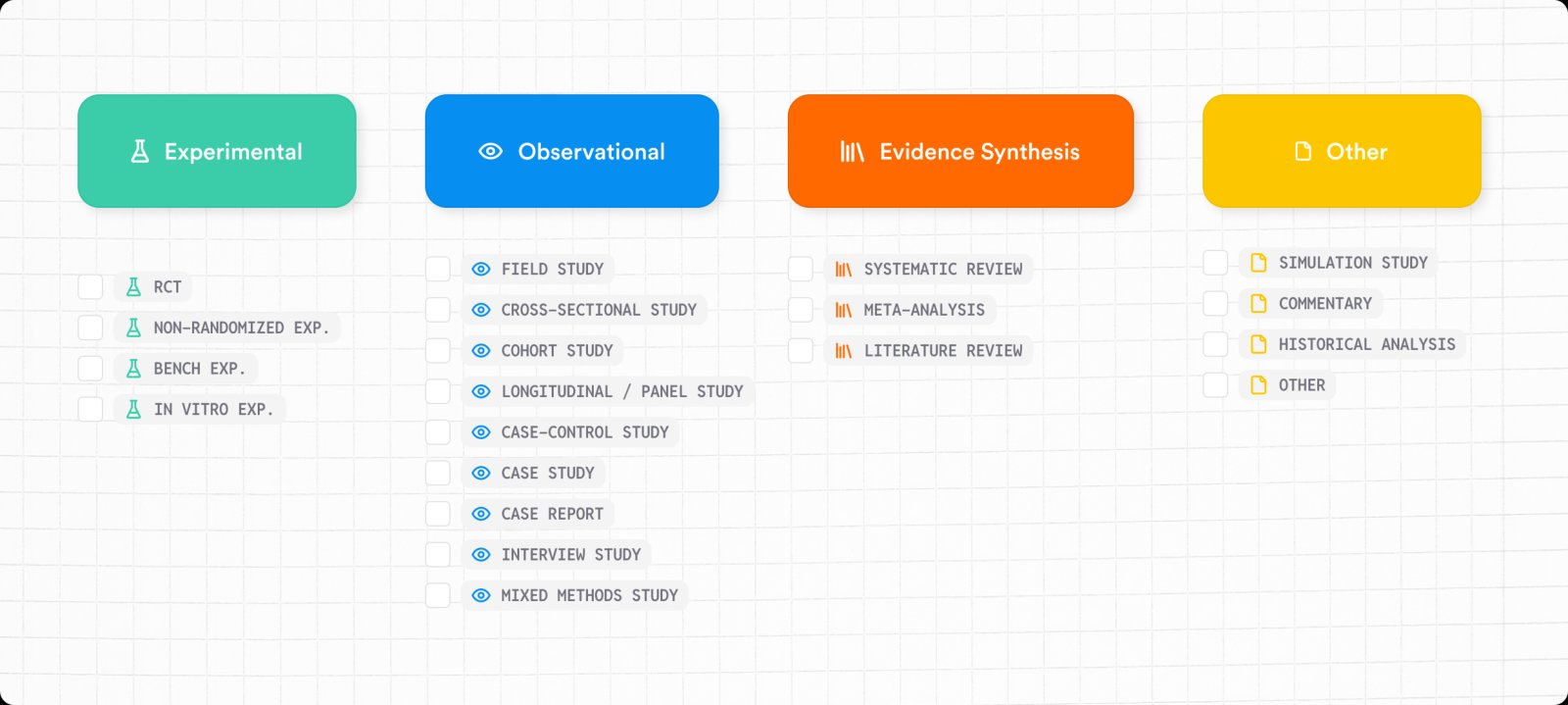 Not all study types are equally strong:
1. **Systematic review / meta-analysis**: combines many studies on the same question. A great place to start.
2. **RCT (randomized controlled trial)**: people are randomly assigned to a treatment or a comparison group. The best single study for cause and effect.
3. **Cohort, case-control, cross-sectional**: observational studies that track or compare groups without assigning treatments. Useful, but they show links, not proof of cause.
4. **Case study / case report**: one person or a small group. Good for rare situations and new ideas.
The list above runs roughly from strongest to weakest evidence for a "does X cause Y?" question.
Other types, like literature reviews and commentaries, summarize or discuss research without new data. See [Research terms in plain English](/learn/research-terms) for more.
## Try it on your topic
Run a search on your topic, expand the search trace, and look through the References panel.
**You should now have:** 3 papers you'd read first, and a reason for each. For example: "the most recent meta-analysis", "the most cited RCT", "the only study in my population".
This documentation is built and hosted on [Mintlify](https://mintlify.com), a developer documentation platform.
Not all study types are equally strong:
1. **Systematic review / meta-analysis**: combines many studies on the same question. A great place to start.
2. **RCT (randomized controlled trial)**: people are randomly assigned to a treatment or a comparison group. The best single study for cause and effect.
3. **Cohort, case-control, cross-sectional**: observational studies that track or compare groups without assigning treatments. Useful, but they show links, not proof of cause.
4. **Case study / case report**: one person or a small group. Good for rare situations and new ideas.
The list above runs roughly from strongest to weakest evidence for a "does X cause Y?" question.
Other types, like literature reviews and commentaries, summarize or discuss research without new data. See [Research terms in plain English](/learn/research-terms) for more.
## Try it on your topic
Run a search on your topic, expand the search trace, and look through the References panel.
**You should now have:** 3 papers you'd read first, and a reason for each. For example: "the most recent meta-analysis", "the most cited RCT", "the only study in my population".
This documentation is built and hosted on [Mintlify](https://mintlify.com), a developer documentation platform.