> ## Documentation Index
> Fetch the complete documentation index at: https://docs.consensus.app/llms.txt
> Use this file to discover all available pages before exploring further.
# Build a comparison table of studies
> Compare interventions side by side with the same metrics. Run parallel searches, then extract sample size, session count, follow-up duration, and effect size into one table.
Comparing interventions across studies usually means hours of pulling values out of PDFs. This tutorial builds a side-by-side table in two searches, using RCTs on CBT, IPT, and digital interventions for adolescent depression.
**You'll learn how to:**
1. Run parallel searches across multiple interventions in one query
2. Extract sample size, session count, follow-up duration, and effect sizes into a structured table
3. Use the table to spot the strongest intervention and evidence gaps at a glance
## Step 1: Search several interventions at once
```text theme={null}
Find RCTs on CBT, IPT, and digital interventions for adolescent depression.
```
Research Agent runs three searches in parallel, one per intervention, each with a **randomized controlled trial** filter applied. It finds over 300,000 papers, deduplicates them, and shortlists the 20 most relevant. The answer already includes a table of populations, interventions, and key findings.
Click the **filter** button in the search bar to see every study-type filter: RCT, case study, in vivo, in vitro, human studies only, and more.
## Step 2: Ask for the exact columns you need
```text theme={null}
Build a comparison table with columns: intervention type, sample size, session
count, follow-up duration, and effect size on depression symptoms.
```
Consensus loads the papers from the previous thread, reads the full text where available (or the abstract), narrows to 10 studies, and returns the exact table with a link to each paper.
A **checkmark** next to a citation means the full text was used. Click the **PDF** button to read the study inside Consensus.
## Step 3: Ask a paper about itself
Attach a paper to the search bar and ask a follow-up:
```text theme={null}
What gaps did the authors mention?
```
Consensus reads the entire full text. Hover a citation in the answer to see the quote it came from, then click **Show in paper** to open the PDF at the highlighted passage.
If Consensus doesn't have the full text, attach the PDF yourself or [import your Zotero library](/core-features/library). Uploads are private to you.
## Table view: the built-in comparison
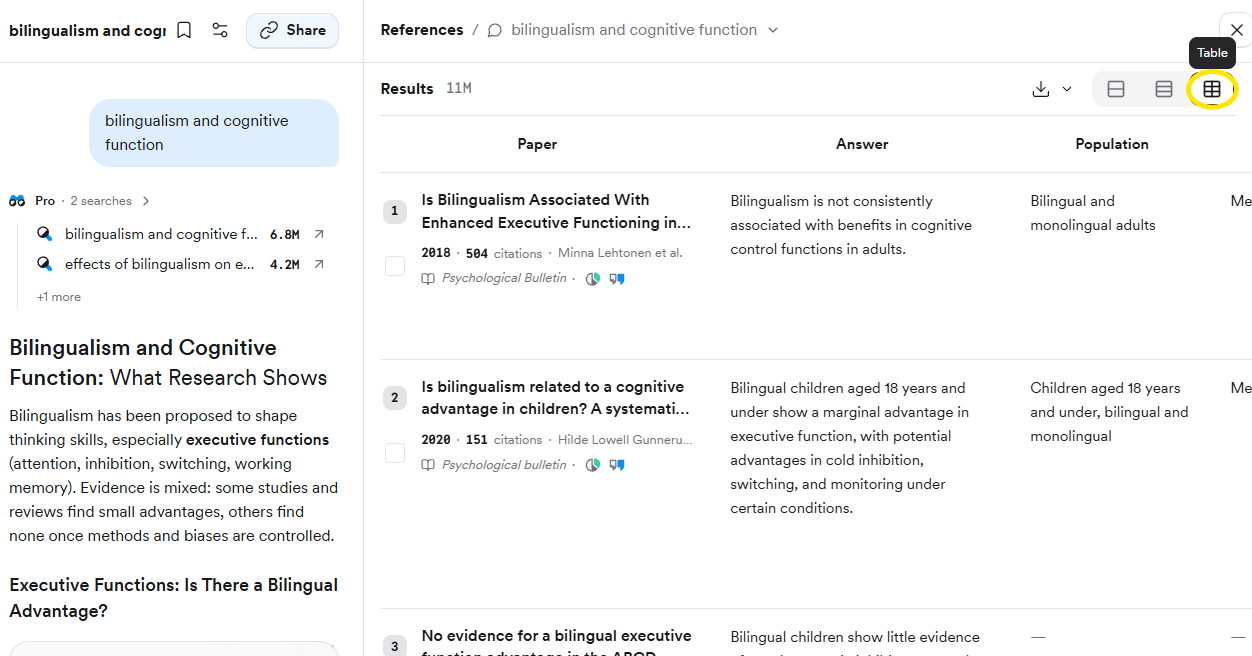
You don't always need a prompt. Open **References** on the right and click the **Table** view button to extract study attributes side by side for every paper in the results: key takeaway, population, methods, results, outcomes, sample size, study count, duration, and country. Fields Consensus can't extract are left blank.
| Plan | Papers per query in table view |
| ---- | ------------------------------ |
| Free | 3 |
| Pro | 20 |
| Deep | 50 |
## Attach papers straight from the results
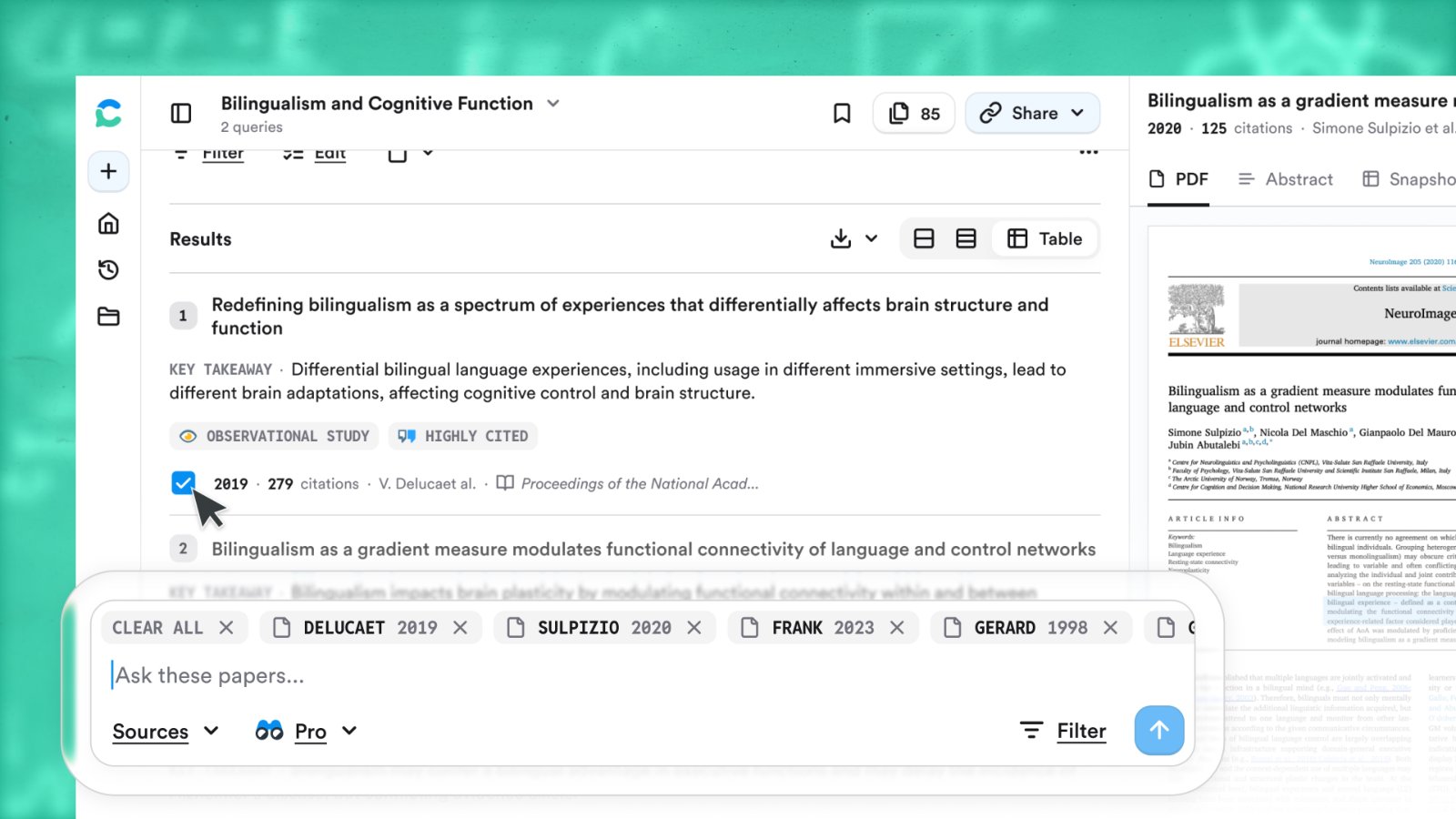
Tick the boxes next to specific papers in the results list and ask your question in the search bar at the bottom. Only those papers are used, and Consensus reads their full text where available.
## Export the table or the papers
* **The answer** — scroll to the bottom and click **Export** for **Copy text**, **Copy with citations** (APA, MLA, Chicago, Harvard, LaTeX, AMA/Numeric), or **Export as PDF**. Tables survive a paste into Word, Docs, Notion, or Obsidian.
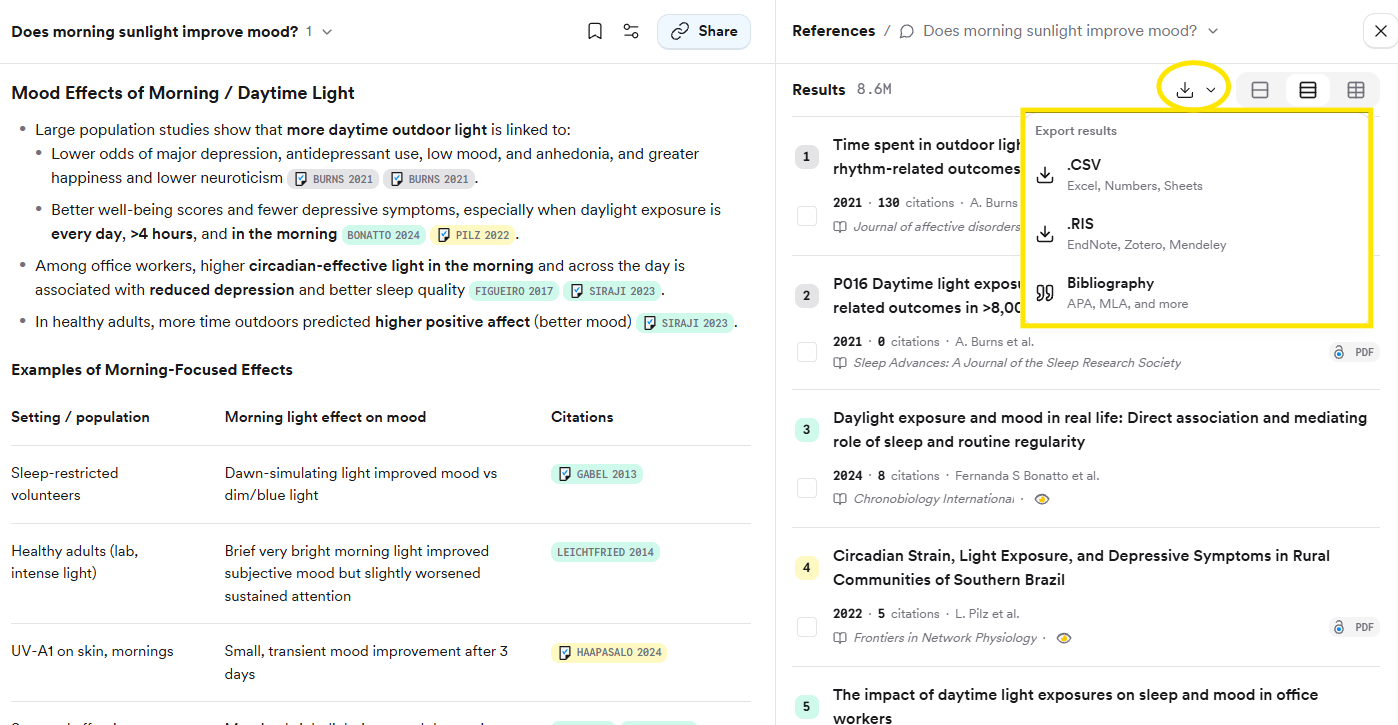
* **The papers** — click the download arrow at the top of the results for **CSV**, **RIS** (EndNote, Zotero, Mendeley), or a **Bibliography**.
## Related tutorials
 | Plan | Papers per query in table view |
| ---- | ------------------------------ |
| Free | 3 |
| Pro | 20 |
| Deep | 50 |
## Attach papers straight from the results
Tick the boxes next to specific papers in the results list and ask your question in the search bar at the bottom. Only those papers are used, and Consensus reads their full text where available.
| Plan | Papers per query in table view |
| ---- | ------------------------------ |
| Free | 3 |
| Pro | 20 |
| Deep | 50 |
## Attach papers straight from the results
Tick the boxes next to specific papers in the results list and ask your question in the search bar at the bottom. Only those papers are used, and Consensus reads their full text where available.
 ## Export the table or the papers
* **The answer** — scroll to the bottom and click **Export** for **Copy text**, **Copy with citations** (APA, MLA, Chicago, Harvard, LaTeX, AMA/Numeric), or **Export as PDF**. Tables survive a paste into Word, Docs, Notion, or Obsidian.
* **The papers** — click the download arrow at the top of the results for **CSV**, **RIS** (EndNote, Zotero, Mendeley), or a **Bibliography**.
## Export the table or the papers
* **The answer** — scroll to the bottom and click **Export** for **Copy text**, **Copy with citations** (APA, MLA, Chicago, Harvard, LaTeX, AMA/Numeric), or **Export as PDF**. Tables survive a paste into Word, Docs, Notion, or Obsidian.
* **The papers** — click the download arrow at the top of the results for **CSV**, **RIS** (EndNote, Zotero, Mendeley), or a **Bibliography**.
 ## Related tutorials