> ## Documentation Index
> Fetch the complete documentation index at: https://docs.consensus.app/llms.txt
> Use this file to discover all available pages before exploring further.
# Find research gaps in your Library with Deep Search
> Run a comprehensive analysis across only the papers you've collected. Surface population gaps, missing study types, and follow-up questions across hundreds or thousands of papers.
If you've saved hundreds or thousands of papers, Deep Search can analyze them as a corpus. This tutorial runs a population gap analysis across a \~400-paper Library.
**You'll learn how to:**
1. Attach your whole Library to a search
2. Run Deep Search scoped to your saved papers
3. Follow up against the broader index to fill the gaps
## Before you start
Open **My Library** and add papers by uploading, pasting DOIs, or importing from Zotero (which brings in full text too). Everything you upload is private and isn't used to train models.
## Step 1: Ask a Deep question of your Library
From inside My Library, the Library is already attached to the search bar. Type your question and toggle on **Deep**.
```text theme={null}
What are the population gaps in the research I've collected on muscle
development?
```
Deep Search samples your Library, finds an initial 20 relevant papers, then generates and runs its own sub-questions systematically across your papers. Every search is tagged with your Library, so it never touches the broader index. In the example it found 109 eligible papers and read 50.
The answer includes a visual map of where studies are missing by population. In the example: no longitudinal data, few sex-specific analyses, and thin intervention data for race, ethnicity, and special clinical populations.
## Step 2: Fill the gaps from the full index
Remove the Library from the search bar and ask:
```text theme={null}
Search the broader index to find papers that fill these gaps. Focus on papers
published in the last 10 years.
```
Consensus keeps the gaps as context and searches all 220 million papers.
A regular Pro message works for small Collections (see [Fill Collection gaps](/search-basics/fill-collection-gaps)). Use Deep when the Library is hundreds or thousands of papers.
## What Deep Search does behind the panel
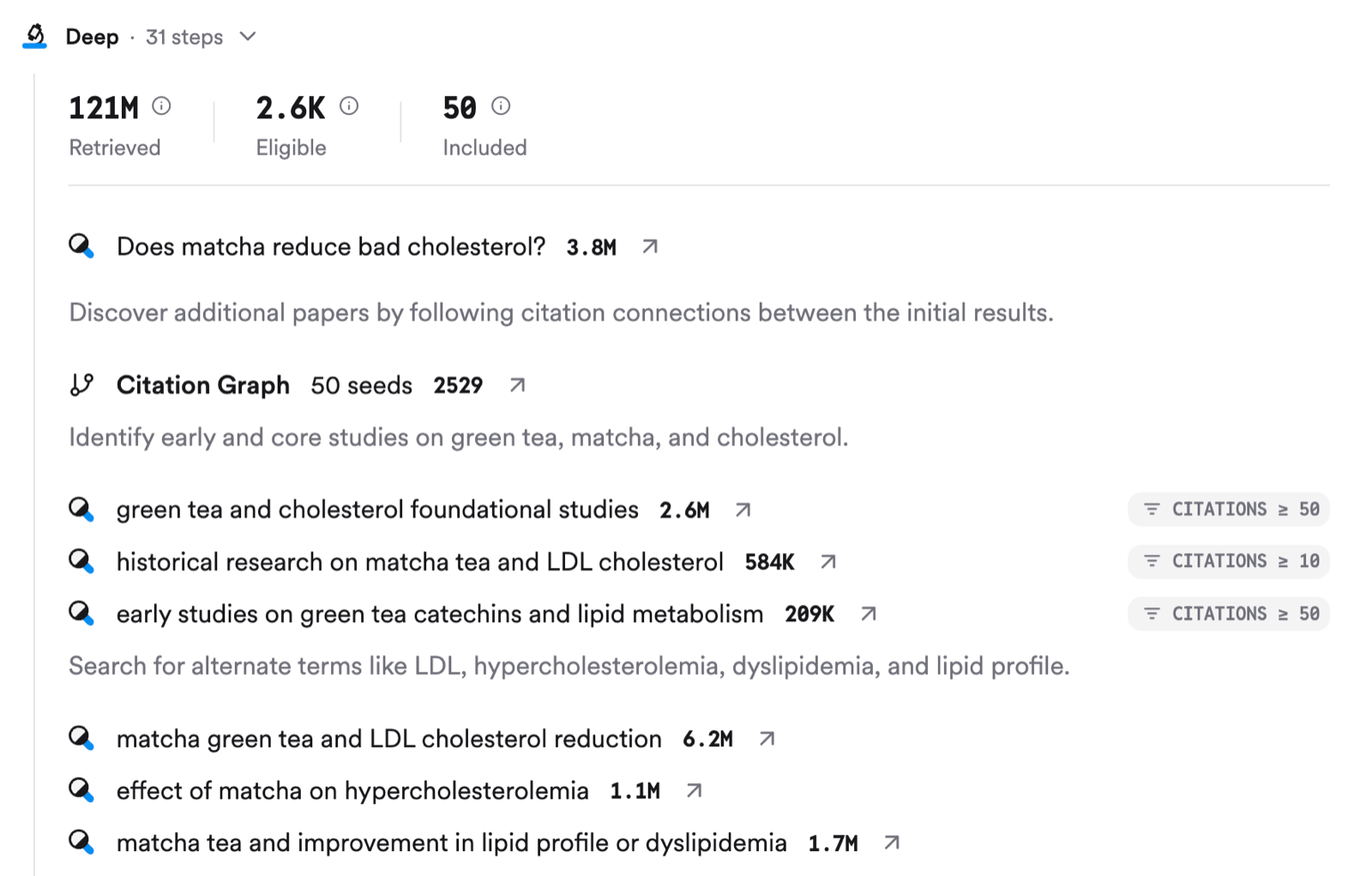
The right-hand panel shows the plan as it runs: papers identified, screened, eligible, and included, then each phase (initial survey, clarified constructs, rephrased synonyms, contrasting evidence) with its searches and eligible-paper counts. Every search here is tagged with your Library.
Deep is a longer, more robust version of a Pro search: up to 20 searches in parallel, multiple Research Agent tools like citation crawl, and 50 to 100 papers read. The answer's shape follows your prompt: a synthesis, a comparison, a critique, a reading list, an evidence map, or a custom report.
## Export the report
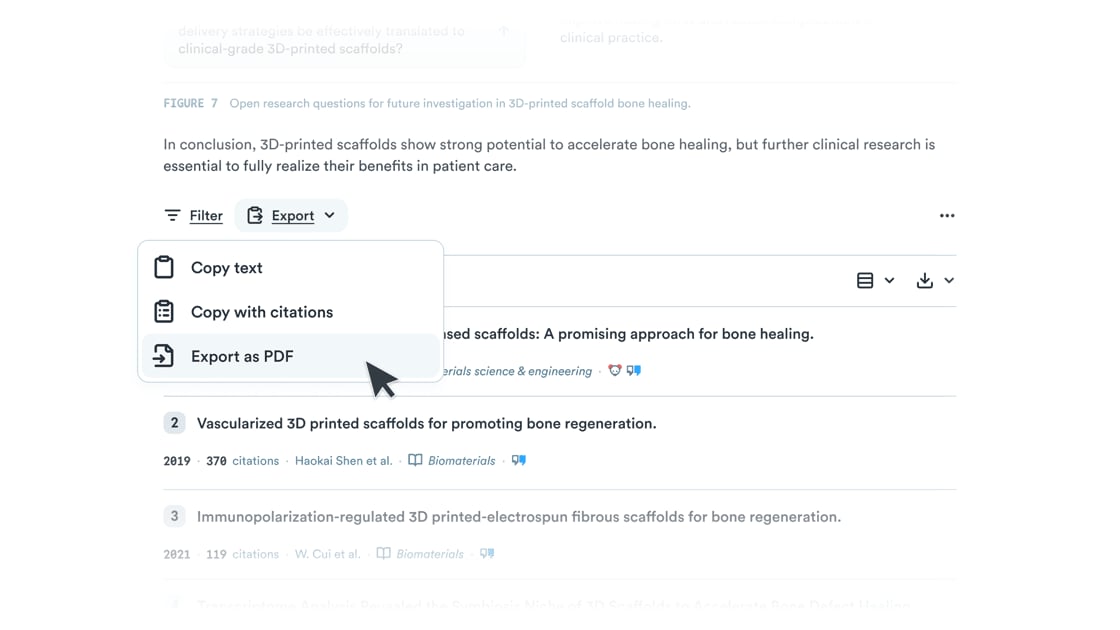
Scroll to the bottom and click **Export**: **Copy text**, **Copy with citations** (APA, MLA, Chicago, Harvard, LaTeX, AMA/Numeric), or **Export as PDF**. Set the in-line citation style (author-year or numeric) from the thread settings button at the top of the page.
| Plan | Deep searches per month |
| ----- | ---------------------------------- |
| Free | 3 (also uses a Pro message credit) |
| Pro | 15 |
| Deep | 200 |
| Teams | 50 per user |
## Related tutorials
 Deep is a longer, more robust version of a Pro search: up to 20 searches in parallel, multiple Research Agent tools like citation crawl, and 50 to 100 papers read. The answer's shape follows your prompt: a synthesis, a comparison, a critique, a reading list, an evidence map, or a custom report.
## Export the report
Scroll to the bottom and click **Export**: **Copy text**, **Copy with citations** (APA, MLA, Chicago, Harvard, LaTeX, AMA/Numeric), or **Export as PDF**. Set the in-line citation style (author-year or numeric) from the thread settings button at the top of the page.
Deep is a longer, more robust version of a Pro search: up to 20 searches in parallel, multiple Research Agent tools like citation crawl, and 50 to 100 papers read. The answer's shape follows your prompt: a synthesis, a comparison, a critique, a reading list, an evidence map, or a custom report.
## Export the report
Scroll to the bottom and click **Export**: **Copy text**, **Copy with citations** (APA, MLA, Chicago, Harvard, LaTeX, AMA/Numeric), or **Export as PDF**. Set the in-line citation style (author-year or numeric) from the thread settings button at the top of the page.
 | Plan | Deep searches per month |
| ----- | ---------------------------------- |
| Free | 3 (also uses a Pro message credit) |
| Pro | 15 |
| Deep | 200 |
| Teams | 50 per user |
## Related tutorials
| Plan | Deep searches per month |
| ----- | ---------------------------------- |
| Free | 3 (also uses a Pro message credit) |
| Pro | 15 |
| Deep | 200 |
| Teams | 50 per user |
## Related tutorials