> ## Documentation Index
> Fetch the complete documentation index at: https://docs.consensus.app/llms.txt
> Use this file to discover all available pages before exploring further.
# Find and fill gaps in a Collection
> Run a gap analysis on a Consensus Collection, then automatically pull recent papers that cover the missing topics and populations.
A reading list needs to stay current and cover its blind spots, but it's hard to know what you're missing without starting over. This tutorial runs a gap analysis on a \~20-paper Collection about muscle development in athletes, then fills the gaps from the full index.
**You'll learn how to:**
1. Generate a research gaps matrix scoped to a single Collection
2. Identify missing topics, populations, and methodologies
3. Find recent papers that fill those gaps and save them to the Collection
## Before you start
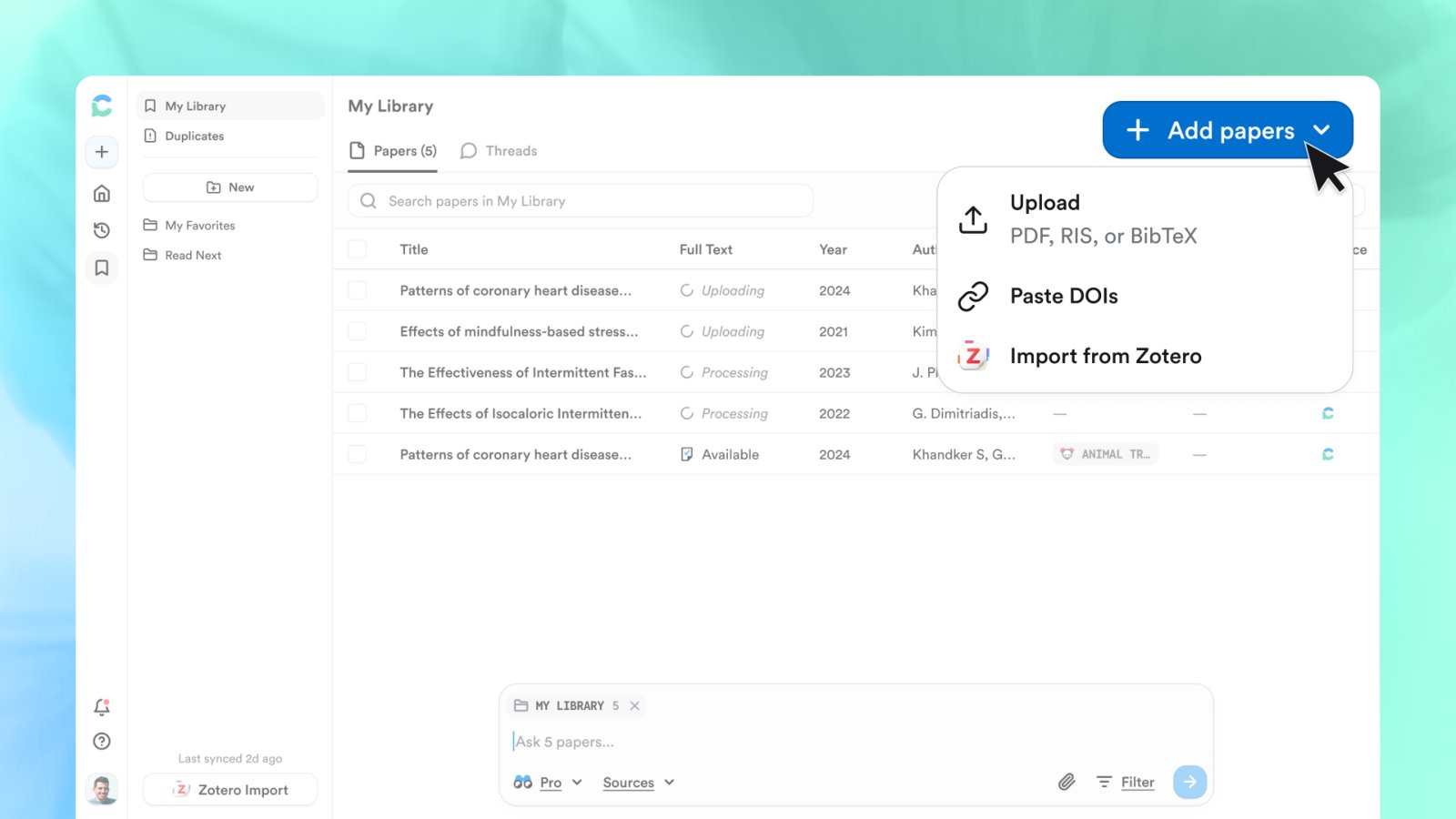
Open **My Library**. If your papers aren't in Consensus yet, use **Add papers** to import from Zotero (entire library, sub-collections, and full text), upload BibTeX, RIS, or PDF files, or paste DOIs. Everything you import is private to you.
## Step 1: Ask for a gaps matrix over the Collection
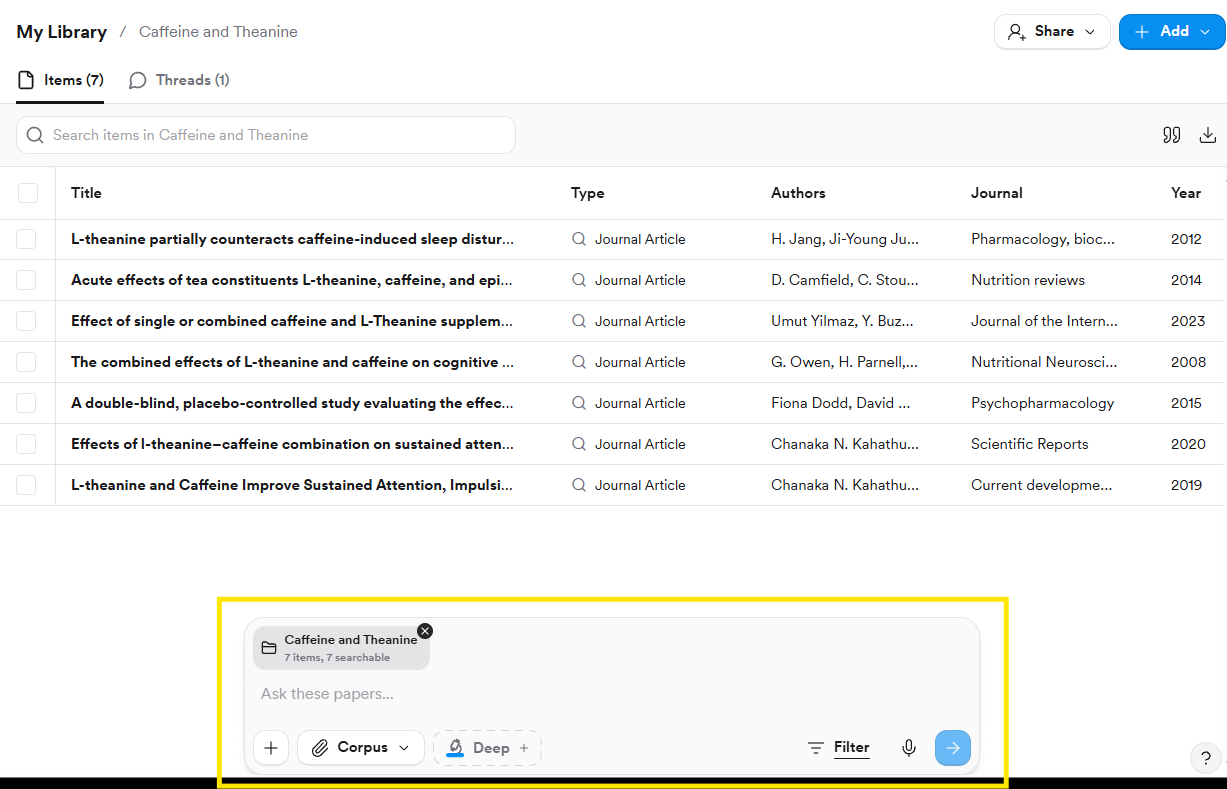
With the Collection open, it's already attached to the search bar. (From anywhere else, click **+** in the search bar to attach it.)
```text theme={null}
Create a research gaps matrix showing what topics or populations are missing
from this collection on muscle development in athletes.
```
Research Agent samples papers from the Collection, runs four searches *within* it to gather the papers related to your topic (so the Collection doesn't need to be tidy), reads them, and returns a visual matrix of topics × populations. In the example: good coverage of adult male resistance training, nothing on female, youth, or elite athletes.
You can specify the axes: "create a research gaps matrix that looks at \[variable A] by \[variable B]".
## Step 2: Search the full index to fill the gaps
Remove the Collection from the search bar (click **×** on it, or set **Corpus** to **All**) so Consensus searches the whole index rather than just your attachments.
```text theme={null}
Find papers published in the last 5 years that fill those gaps.
```
Consensus keeps the gaps from the previous answer as context, runs one search per gap in parallel with a 5-year recency filter, deduplicates, and shortlists 20 papers from 178 eligible ones.
Add extra constraints if you want: female athletes only, Q1 journals only, a specific country.
## Step 3: Save the results
* Hover a citation and click **bookmark** to save it to the Collection.
* Or open **References**, select several papers, and save them in one go.
* Save the whole thread to your Library to come back to it later.
Repeat this over time to keep a Collection current.
The video description mentions regenerative agriculture; the recorded demo uses a Collection on muscle development in athletes.
## Getting papers into a Collection
Click **Add papers** in the top right of My Library:
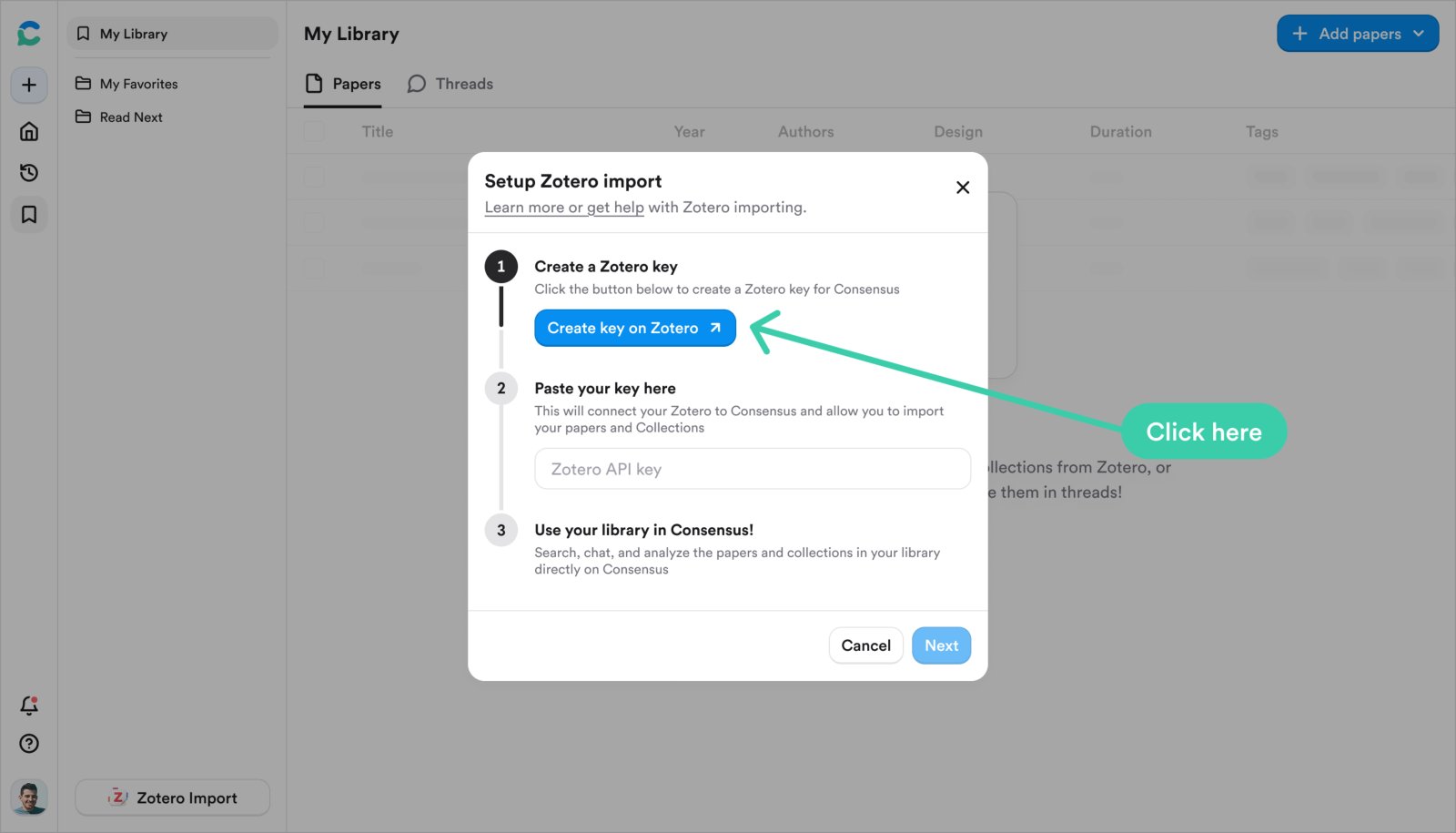
1. Click **Import Zotero** and then **Create key on Zotero**. Zotero opens a pre-filled **New Key** page titled "Consensus".
2. Click **Save Key** and copy the key; it's shown once.
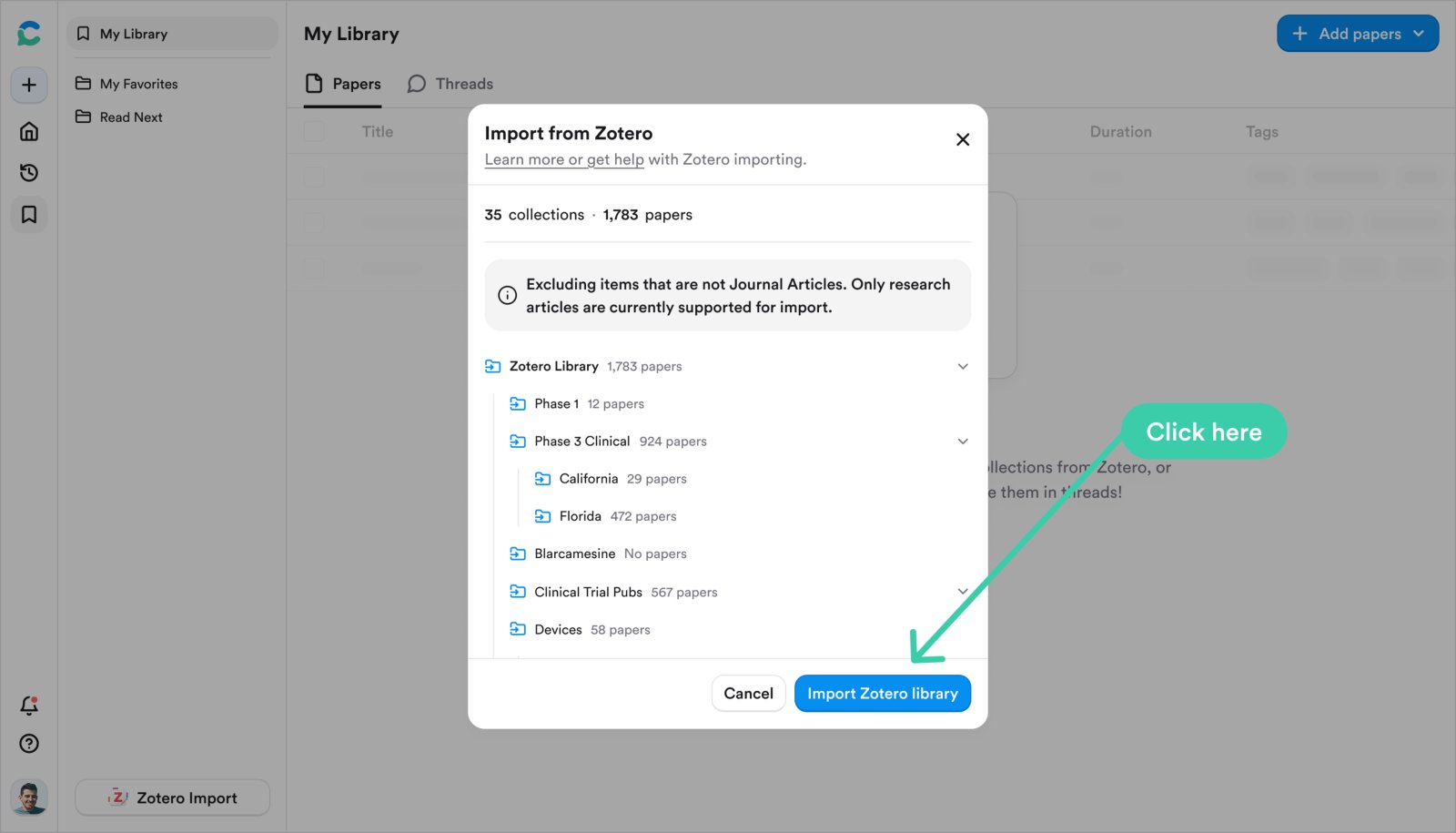
3. Paste it into Consensus, click **Next**, review the collections it found, and click **Import Zotero library**.
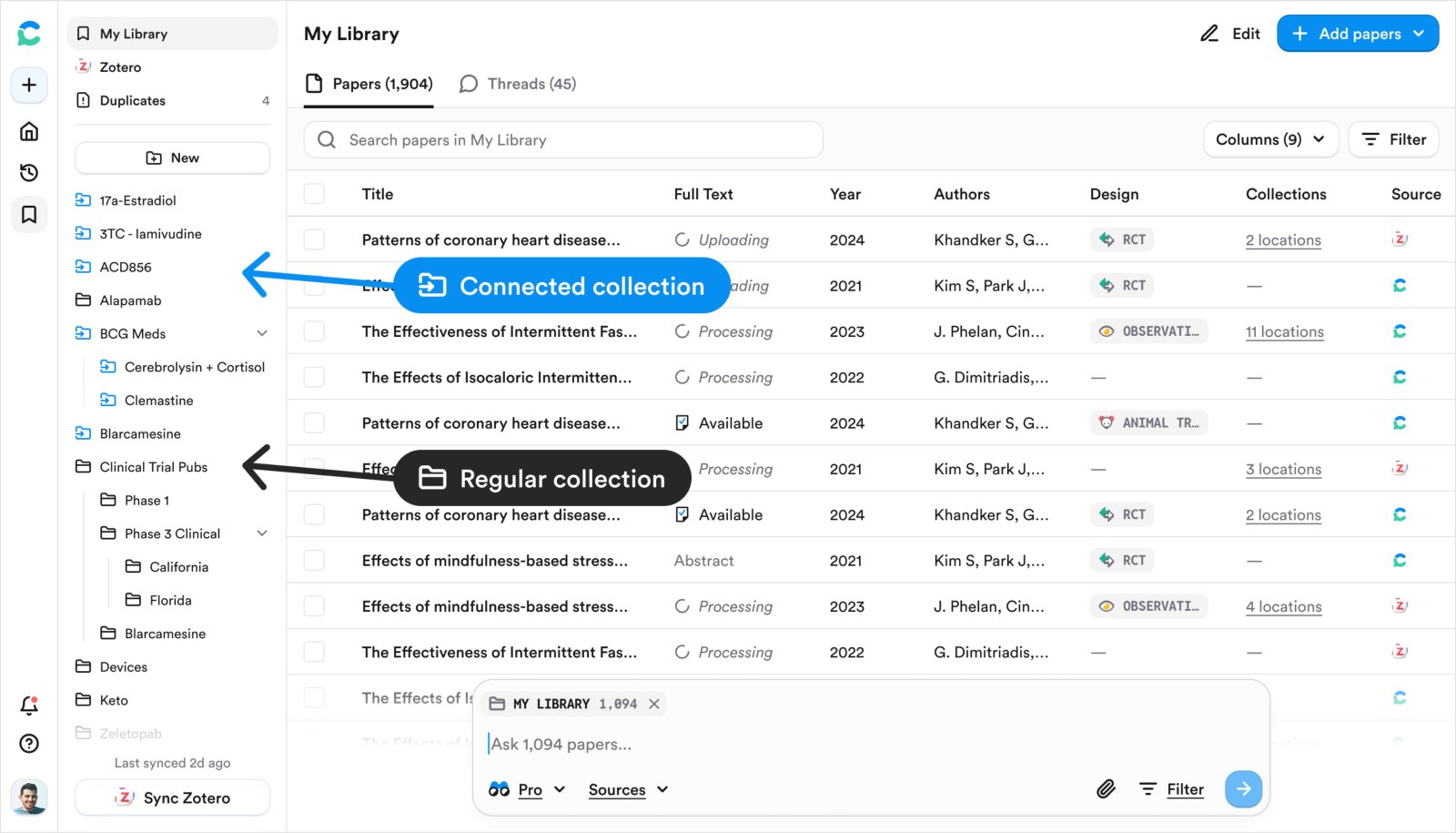
Imported collections appear as blue **Connected collections** that keep your Zotero folder structure. Import is one-way and manual: click any **Import from Zotero** button again to pull in new papers. Both personal and group libraries work, with no size limit. PDFs stored in Zotero come along; externally linked files don't.
Up to 20 PDFs at a time, 50 MB each, text-based (scanned or image-only PDFs can't be processed). RIS and BibTeX files import their references. Uploads are private unless you share a Collection containing them.
## Ask a Collection from inside My Library
Open the Collection and type in the search bar at the bottom. The Collection is attached automatically, so only its papers are used. From the main search page, click **+** to attach a Collection or **Corpus › My Library** for everything you've saved. Both run as Pro or Deep messages.
## Save several results at once
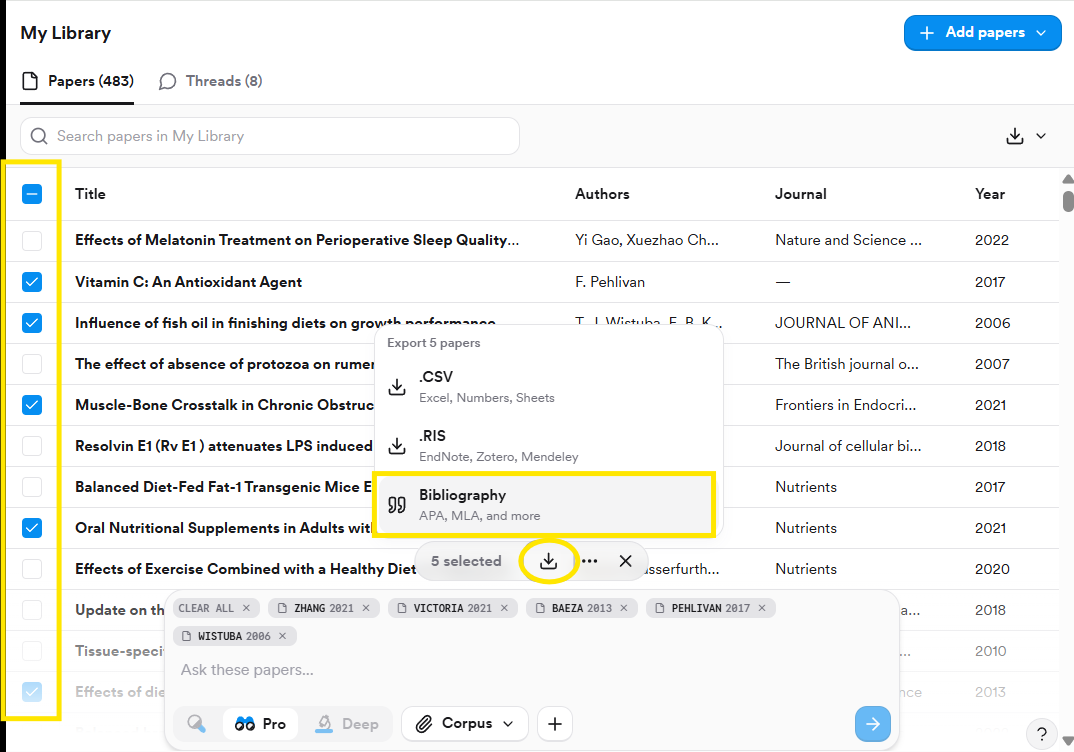
Select papers in the References panel or in My Library, then use the download arrow to export a **Bibliography**, **CSV**, or **RIS**, or the bookmark to file them into a Collection.
## Related tutorials
 Imported collections appear as blue **Connected collections** that keep your Zotero folder structure. Import is one-way and manual: click any **Import from Zotero** button again to pull in new papers. Both personal and group libraries work, with no size limit. PDFs stored in Zotero come along; externally linked files don't.
 ## Save several results at once
Select papers in the References panel or in My Library, then use the download arrow to export a **Bibliography**, **CSV**, or **RIS**, or the bookmark to file them into a Collection.
## Save several results at once
Select papers in the References panel or in My Library, then use the download arrow to export a **Bibliography**, **CSV**, or **RIS**, or the bookmark to file them into a Collection.
 ## Related tutorials