> ## Documentation Index
> Fetch the complete documentation index at: https://docs.consensus.app/llms.txt
> Use this file to discover all available pages before exploring further.
# Find high-quality recent papers
> Cut through preprints and low-impact work. Stack year, journal quality, and citation filters in plain language, then visualize the results on a research timeline.
When you search a topic, you usually get a flood of papers: preprints mixed with strong studies, low-impact work next to landmark trials. This tutorial shows how to get only credible, recent, high-impact research in two searches.
**You'll learn how to:**
1. Filter results by year, journal quality, and peer-review status
2. Stack a citation threshold on top of an existing result set
3. Generate a research timeline to see when key papers were published
## Step 1: Search with filters in plain language
Describe the topic and the filters you want in one message. Research Agent recognizes the criteria and applies the matching filters.
```text theme={null}
Find high-quality papers on GLP-1 agonists and cardiovascular outcomes.
Only papers since 2020, and only in Q1 journals.
```
Behind the scenes, Consensus:
* Applies a **year ≥ 2020** filter and a **Q1 journal** filter
* Expands your topic into the best search terms and runs two searches
* Aggregates roughly 900,000 candidate papers, narrows them to 74 that meet your criteria, and shortlists the top 20
The AI overview on the left summarizes outcomes, subgroups, and comparators. The papers on the right are all post-2020 and all from high-quality journals.
## Step 2: Add a citation threshold and a timeline
Ask a follow-up in the same thread. Research Agent keeps the context, so it re-reads the papers it just found rather than starting over.
```text theme={null}
Narrow this down to papers with over 50 citations and show me a research
timeline of when those papers were published.
```
Consensus reads the previous thread, keeps the papers with more than 50 citations (about 10), and builds a timeline showing when each was published and what milestone it represents.
Other filters you can state in plain language: study type (RCT, meta-analysis, systematic review), human studies only, minimum sample size, and specific countries. See [Research Agent](/core-features/research-agent).
## Every filter, explained
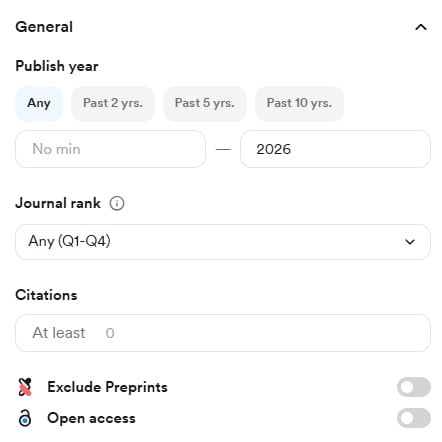
Research Agent applies filters for you when you describe them, but you can also set them by hand. Click the **Filter** button (three dashes) in the search bar, choose your filters, and click **Apply filter**. Filters stack, so "Q1 journals, RCTs only, human studies, past 5 years" is one panel.
* **Publish year** — pick a preset (past 2, 5, or 10 years) or set a custom range.
* **Journal rank** — the SCImago Journal Rank (SJR) quartile. Q1 is the top 25% of journals in a field by influence; Q4 is the bottom 25%.
* **Citations** — a minimum citation count. High citations signal influence, not necessarily validity.
* **Exclude preprints** — remove papers that haven't been peer reviewed.
* **Open access** — only papers whose full text is viewable.
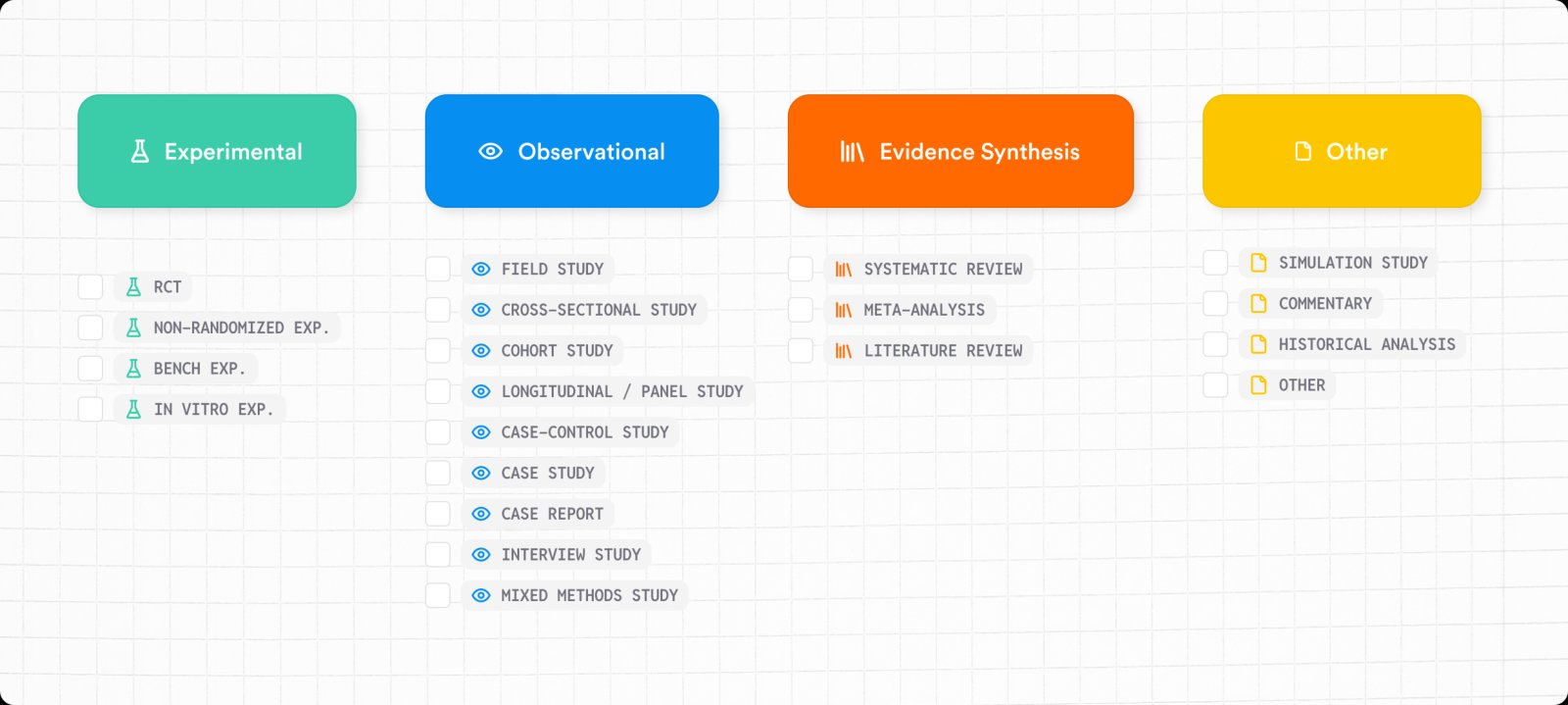
Consensus classifies every paper by study type. Filter by any of 19 designs across four groups:
**Experimental** — the researchers test an intervention.
* **RCT** — a randomized controlled trial with a randomly assigned control group.
* **Non-RCT experiment** — an intervention is given but participants aren't randomly assigned.
* **Bench experiment** — a laboratory study outside a clinical or field setting.
* **In vitro experiment** — conducted outside a living organism, such as a culture dish.
**Observational** — subjects, events, or outcomes are examined without assigning an intervention.
* **Field study** — data collected in a real-world setting.
* **Cross-sectional study** — a population at a single point in time.
* **Cohort study** — follows a group over time to study outcomes or exposures.
* **Longitudinal / panel study** — repeated observations of the same subjects.
* **Case-control study** — compares subjects with an outcome to those without, looking back for risk factors.
* **Case study** — an in-depth analysis of one person, group, event, or organization.
* **Case report** — describes a specific individual or small group, usually clinical.
* **Interview study** — qualitative data gathered through interviews.
* **Mixed methods study** — combines quantitative and qualitative methods.
**Evidence synthesis** — reviews, summarizes, or statistically combines existing research.
* **Systematic review** — a review with explicit, systematic inclusion criteria.
* **Meta-analysis** — a "study of studies" that statistically combines results.
* **Literature review** — a review without the explicit criteria of a systematic review.
**Other** — simulation study, commentary, historical analysis.
A study type tells you how research was conducted, not how good it is. Systematic reviews, meta-analyses, and RCTs sit at the top of the evidence hierarchy for treatment questions, but the right design depends on the question.
* **Setting** — human or animal studies.
* **Sample size** — a minimum number of participants, subjects, or observations.
* **Duration** — how long the study ran, in days, weeks, months, or years. Useful for comparing short-term efficacy with long-term safety, dietary interventions over time, or short- versus long-term exposure.
* **Controlled studies only** — only studies with a control, placebo, or hold-out group.
* **Publisher** — 44 options, including Elsevier, Wiley, Springer Nature, Oxford University Press, IEEE, PLOS, BMJ, JAMA, and NEJM.
* **Field of study** — 23 fields, from Agricultural and Food Sciences to Sociology.
* **Country** — where the study took place, from more than 200 countries.
Each of these is also available as a parameter in the [API](/core-features/api) and [MCP](/core-features/mcp). Full definitions live in the help center's [Advanced Search Filters](https://help.consensus.app/en/articles/9922799-advanced-search-filters) article.
## Related tutorials


 **Experimental** — the researchers test an intervention.
* **RCT** — a randomized controlled trial with a randomly assigned control group.
* **Non-RCT experiment** — an intervention is given but participants aren't randomly assigned.
* **Bench experiment** — a laboratory study outside a clinical or field setting.
* **In vitro experiment** — conducted outside a living organism, such as a culture dish.
**Observational** — subjects, events, or outcomes are examined without assigning an intervention.
* **Field study** — data collected in a real-world setting.
* **Cross-sectional study** — a population at a single point in time.
* **Cohort study** — follows a group over time to study outcomes or exposures.
* **Longitudinal / panel study** — repeated observations of the same subjects.
* **Case-control study** — compares subjects with an outcome to those without, looking back for risk factors.
* **Case study** — an in-depth analysis of one person, group, event, or organization.
* **Case report** — describes a specific individual or small group, usually clinical.
* **Interview study** — qualitative data gathered through interviews.
* **Mixed methods study** — combines quantitative and qualitative methods.
**Evidence synthesis** — reviews, summarizes, or statistically combines existing research.
* **Systematic review** — a review with explicit, systematic inclusion criteria.
* **Meta-analysis** — a "study of studies" that statistically combines results.
* **Literature review** — a review without the explicit criteria of a systematic review.
**Other** — simulation study, commentary, historical analysis.
**Experimental** — the researchers test an intervention.
* **RCT** — a randomized controlled trial with a randomly assigned control group.
* **Non-RCT experiment** — an intervention is given but participants aren't randomly assigned.
* **Bench experiment** — a laboratory study outside a clinical or field setting.
* **In vitro experiment** — conducted outside a living organism, such as a culture dish.
**Observational** — subjects, events, or outcomes are examined without assigning an intervention.
* **Field study** — data collected in a real-world setting.
* **Cross-sectional study** — a population at a single point in time.
* **Cohort study** — follows a group over time to study outcomes or exposures.
* **Longitudinal / panel study** — repeated observations of the same subjects.
* **Case-control study** — compares subjects with an outcome to those without, looking back for risk factors.
* **Case study** — an in-depth analysis of one person, group, event, or organization.
* **Case report** — describes a specific individual or small group, usually clinical.
* **Interview study** — qualitative data gathered through interviews.
* **Mixed methods study** — combines quantitative and qualitative methods.
**Evidence synthesis** — reviews, summarizes, or statistically combines existing research.
* **Systematic review** — a review with explicit, systematic inclusion criteria.
* **Meta-analysis** — a "study of studies" that statistically combines results.
* **Literature review** — a review without the explicit criteria of a systematic review.
**Other** — simulation study, commentary, historical analysis.


