
Step 1: Type your search
Go to consensus.app and type in the search bar. You can search two ways:
Both work. Consensus matches the meaning of your search as well as the exact words, fixes typos, and understands medical synonyms. A clear question usually gets a more focused answer, so start with keywords if you’re exploring and switch to a question once you know what you’re asking.
Step 2: Choose what to search (optional)
The search bar has a few controls. You can leave them all alone for your first search.
- + adds sources. Attach papers or Collections from your Library, upload a PDF, connect Zotero, or open Search corpus to choose which papers are searched: All (400M+ papers), Medical (top medical journals and clinical guidelines), or My Library (papers you’ve saved).
- Skills runs a ready-made research workflow, such as a structured literature review. See Skills.
- Deep switches on a much longer review. With it off, your search runs as a normal Pro search that reads up to 20 papers. See Go deeper with Deep Review.
- Filter narrows results by year, study type, journal quality, and more. You can also just write filters into your search: “…published since 2020, RCTs only”.
Step 3: Read what comes back
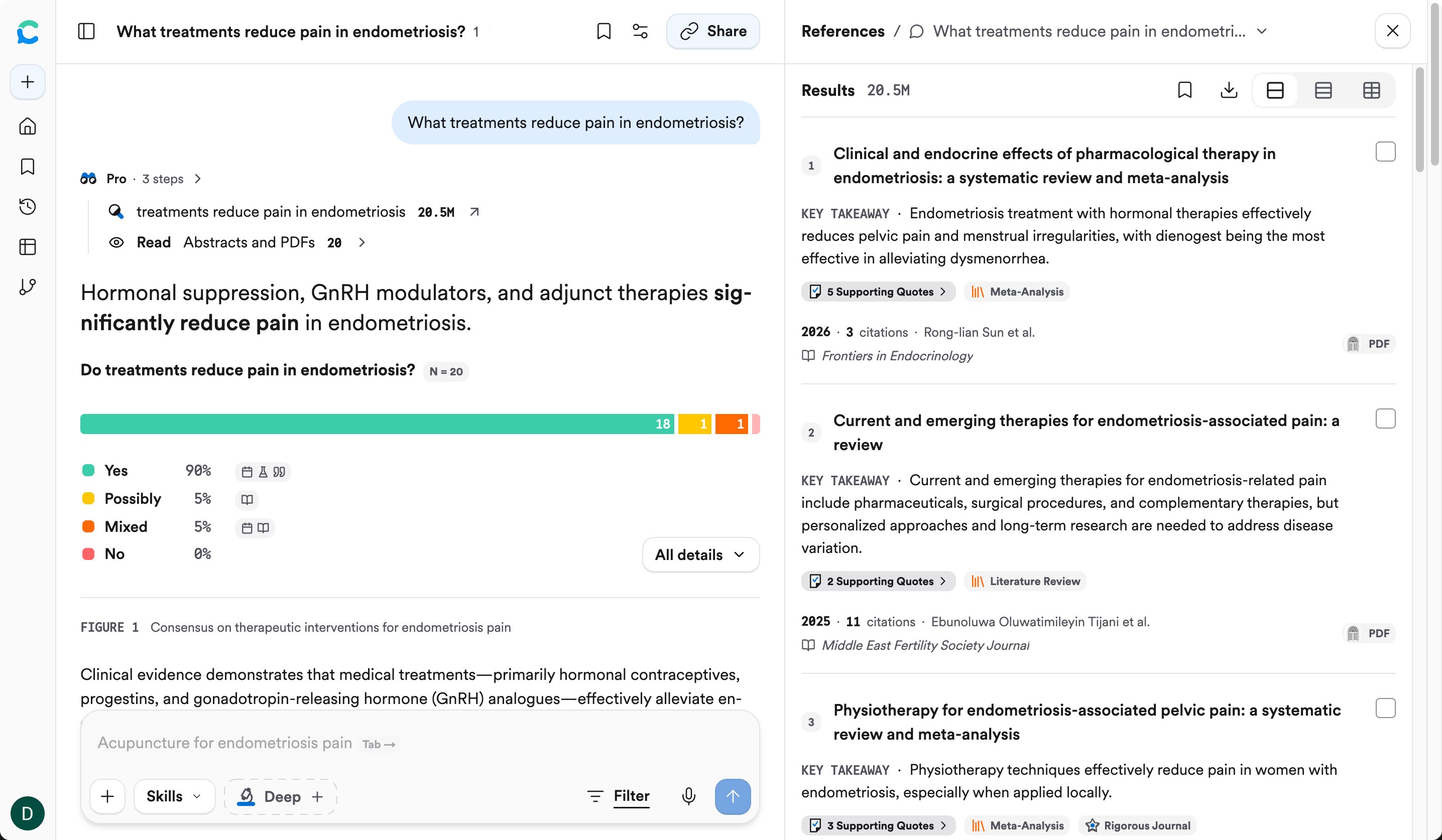
The answer is on the left. The papers it used are on the right.
- At the top of the answer you’ll see the steps Consensus took, like Pro · 3 steps: what it searched for, how many papers matched, and how many it read. Click it to see the details.
- The answer summarizes what the research says. For a yes/no question you’ll also see a meter showing how many papers lean yes, possibly, mixed, or no. The grey tags in the text (like
Sun 2026) are citations. - The References panel lists the papers behind the answer, each with a one-line key takeaway, its supporting quotes, a study-type badge, the year, and how often it’s been cited.
Step 4: Ask a follow-up
Type in the Ask a follow up box under the answer. Consensus remembers the conversation, so you can narrow it down without starting over:Try it on your topic
1
Search with keywords
Type 2–4 keywords about your topic and look at what comes back.
2
Rewrite it as a question
Turn it into a question you actually want answered and search again. Compare the two answers.
3
Ask one follow-up
Narrow it by year, study type, or population.
You should now have: one search on your own topic, phrased as a question, with at least one follow-up.
Go deeper: advanced search tricks
Go deeper: advanced search tricks
- Search for a specific paper with its DOI or title, or for a researcher by name.
- Boolean operators (
AND,OR,NOT) work if you’re used to them. - See every filter in Filter for strong, recent studies.
- See what happens behind the scenes in Paper search.