
Following citations one paper at a time works, but it’s slow. The Citation Graph shows the connections all at once: start from a paper you trust (a seed) and see the papers around it.
Step 1: Open a graph from a paper
Open one of your key papers and click Citation Graph in its sidebar. You can also click Graph in the left sidebar and search for a paper to use as a seed.Step 2: Read the map
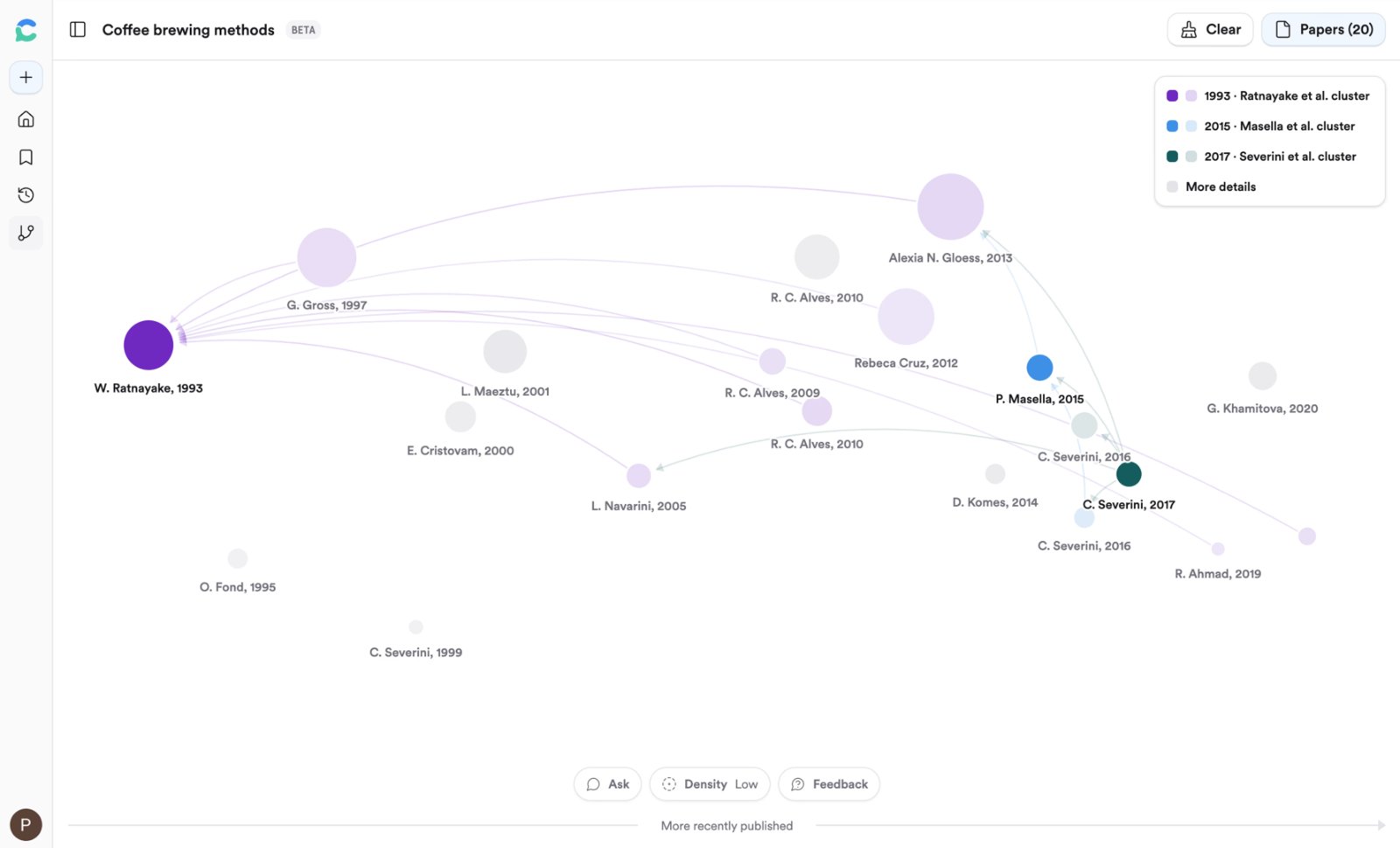
Older papers on the left, newer on the right. Bigger circles are more cited.
- Left to right is time. Papers on the left came before your seed; papers on the right came after.
- Bigger circles have more citations. Big circles on the left are often the field’s foundations.
- Arrows point from a paper to the paper it cites.
Step 3: Ask the graph a question
Click Chat at the bottom of the page. Every paper on the graph is attached, so you can ask:Try it on your topic
Build a graph from your most important paper. Find one older paper it built on and one newer paper that built on it.You should now have: 2–3 new papers for your reading list that you didn’t find through search.
Go deeper: seeds, density, and ranking
Go deeper: seeds, density, and ranking
Add up to 5 seeds, change how many papers are shown, promote a paper to a seed, and learn how papers are ranked. See Citation Graph.